Policy Testing
Test your policies like you test your code
Authorization policies are code. They have conditions, branches, edge cases, and bugs. SAPL has a dedicated test language for them. It follows a decision-based testing approach: requirements describe what decisions the system should produce, scenarios provide concrete authorization subscriptions and verify the expected outcome. You write what a user attempts, what the decision should be, and what obligations it should carry. The test runner evaluates the policy, compares the result, and reports pass or fail. Just the sapl binary and your policy files.
The examples in this guide are taken from the sapl-demos repository (which includes a CLI test runner script) and the sapl-gitops-demo with its live coverage report.
sapl test --dir ./policies
requirement "Doctors and nurses have full read access"
  scenario "doctor can access patient data" ............... PASSED
  scenario "nurse can access patient data" ................ PASSED
requirement "All authenticated users can see the patient list"
  scenario "doctor can see patient list" .................. PASSED
  scenario "visitor can see patient list" ................. PASSED
  scenario "anonymous users cannot see patient list" ...... PASSED

5 passed, 0 failed
A policy and its tests
Consider a policy set that controls access to a patient repository. Doctors and nurses can read records. Authenticated users can list patients. Administrators can read records but with blackened diagnosis fields and a logging obligation.
set "PatientRepository"
first or abstain errors propagate
for "PatientRepository" in action.java.instanceof..simpleName

policy "doctor and nurse access to patient data"
permit
    action.java.name == "findById";
    "ROLE_DOCTOR" in subject..authority || "ROLE_NURSE" in subject..authority;

policy "all authenticated users may see patient list"
permit
    action.java.name == "findAll";
    !("ROLE_ANONYMOUS" in subject..authority);

policy "administrator access to patient data"
permit
    action.java.name == "findById";
    "ROLE_ADMIN" in subject..authority;
obligation
    {
        "type"    : "logAccess",
        "message" : subject.name + " has accessed patient data (id=" + resource.id + ") as an administrator."
    }
The test file validates each requirement with concrete scenarios:
requirement "Doctors and nurses have full read access to patient records" {

    given
        - document "patient_repository_policyset"

    scenario "doctor can access patient data"
        when
            { "name": "Julia", "authorities": [{"authority": "ROLE_DOCTOR"}] }
        attempts
            { "java": { "name": "findById", "instanceof": [{"simpleName": "PatientRepository"}] } }
        on { "id": 1 }
        expect permit;

    scenario "nurse can access patient data"
        when
            { "name": "Thomas", "authorities": [{"authority": "ROLE_NURSE"}] }
        attempts
            { "java": { "name": "findById", "instanceof": [{"simpleName": "PatientRepository"}] } }
        on { "id": 1 }
        expect permit;
}

requirement "All authenticated users can see the patient list" {

    given
        - document "patient_repository_policyset"

    scenario "doctor can see patient list"
        when
            { "name": "Julia", "authorities": [{"authority": "ROLE_DOCTOR"}] }
        attempts
            { "java": { "name": "findAll", "instanceof": [{"simpleName": "PatientRepository"}] } }
        on "patients"
        expect permit;

    scenario "anonymous users cannot see patient list"
        when
            { "name": "anonymous", "authorities": [{"authority": "ROLE_ANONYMOUS"}] }
        attempts
            { "java": { "name": "findAll", "instanceof": [{"simpleName": "PatientRepository"}] } }
        on "patients"
        expect not-applicable;
}
Each scenario is a complete authorization subscription: a subject with roles attempts an action on a resource. The expect clause checks the decision. No mocking framework. No test harness. The test DSL is the test harness.
Mocking PIPs and functions
Policies that reference PIPs or library functions need mocks. The test DSL provides them inline:
requirement "Clearance-based document filtering by time window" {

    given
        - document "classified_documents"

    scenario "NATO_RESTRICTED clearance in first 20 seconds"
        given
            - attribute "nowMock" <time.now> emits "t1"
            - function time.secondOf(any) maps to 5
        when "user" attempts { "java": { "name": "getDocuments" } } on "resource"
        expect decision is permit, with obligation equals {
            "type": "filterClassifiedDocuments",
            "clearance": "NATO_RESTRICTED"
        };

    scenario "NATO_UNCLASSIFIED clearance in 40-60 second window"
        given
            - attribute "nowMock" <time.now> emits "t3"
            - function time.secondOf(any) maps to 45
        when "user" attempts { "java": { "name": "getDocuments" } } on "resource"
        expect decision is permit, with obligation equals {
            "type": "filterClassifiedDocuments",
            "clearance": "NATO_UNCLASSIFIED"
        };
}
attribute "nowMock" <time.now> emits "t1" creates a mock PIP that emits "t1" whenever the policy subscribes to <time.now>. The mock ID "nowMock" identifies it for streaming tests (see below). function time.secondOf(any) maps to 5 makes any call to time.secondOf return 5, regardless of the argument.
The expect clause checks the decision type and the obligation content. with obligation equals {...} verifies that the decision carries exactly that obligation JSON.
Testing streaming behavior
Policies that reference PIPs produce streaming decisions. The test DSL tests this with then blocks that emit new values to attribute mocks:
requirement "Streaming clearance level changes with time" {

    given
        - document "classified_documents"

    scenario "clearance level changes as seconds progress"
        given
            - attribute "nowMock" <time.now> emits "t1"
            - function time.secondOf("t1") maps to 10
            - function time.secondOf("t2") maps to 30
            - function time.secondOf("t3") maps to 50
        when "user" attempts { "java": { "name": "getDocuments" } } on "resource"
        expect decision is permit,
            with obligation containing key "clearance"
            with value matching text "NATO_RESTRICTED"
        then
            - attribute "nowMock" emits "t2"
        expect decision is permit,
            with obligation containing key "clearance"
            with value matching text "COSMIC_TOP_SECRET"
        then
            - attribute "nowMock" emits "t3"
        expect decision is permit,
            with obligation containing key "clearance"
            with value matching text "NATO_UNCLASSIFIED"
        verify
            - attribute <time.now> is called 3 times;
}
The test starts with the PIP emitting "t1". The function mock maps "t1" to second 10, which matches the first policy (seconds < 20). The first expect checks for NATO_RESTRICTED.
Then the PIP emits "t2" (second 30). The policy re-evaluates. The first policy no longer matches (30 is not < 20), but the second does (30 < 40). The decision changes to COSMIC_TOP_SECRET.
Then "t3" (second 50). Neither time-windowed policy matches. The catch-all third policy applies with NATO_UNCLASSIFIED.
The verify block confirms that the PIP was called exactly 3 times, once for each emission.
Integration tests
Unit tests validate individual policies. Integration tests validate the full policy set with the combining algorithm from pdp.json:
requirement "combined policy evaluation with pdp.json" {

    given
        - configuration "."

    scenario "classified documents permit with clearance obligation"
        given
            - attribute "nowMock" <time.now> emits "t1"
            - function time.secondOf(any) maps to 5
        when "user" attempts { "java": { "name": "getDocuments" } } on "resource"
        expect permit;

    scenario "unmatched action denied by default"
        given
            - attribute "nowMock" <time.now> emits "t1"
            - function time.secondOf(any) maps to 5
        when "user" attempts { "java": { "name": "deleteEverything" } } on "resource"
        expect deny;
}
configuration "." loads all .sapl files and pdp.json from the specified directory. The combining algorithm in pdp.json determines how multiple policy results are combined. The last scenario tests that an unmatched action results in deny, which is the defaultDecision from the configuration.
Coverage and quality gates
The sapl test command generates coverage reports and enforces quality gates:
sapl test --dir ./policies \
    --policy-set-hit-ratio 100 \
    --policy-hit-ratio 100 \
    --condition-hit-ratio 80
Four coverage metrics:
| Metric | What it measures |
|---|---|
| Policy set hit ratio | Percentage of policy sets evaluated by at least one test |
| Policy hit ratio | Percentage of individual policies evaluated by at least one test |
| Condition hit ratio | Percentage of boolean conditions evaluated to both true and false |
| Branch coverage ratio | Percentage of code branches (if/else, pattern match arms) exercised |
Exit codes distinguish between failures:
| Exit code | Meaning |
|---|---|
| 0 | All tests passed, quality gate met |
| 1 | Error during test execution |
| 2 | One or more tests failed |
| 3 | Tests passed, but coverage below threshold |
This integrates directly into CI pipelines. The policy operations guide shows how to wire sapl test into a Git-based policy delivery pipeline with signing, bundling, and deployment.
Coverage reports
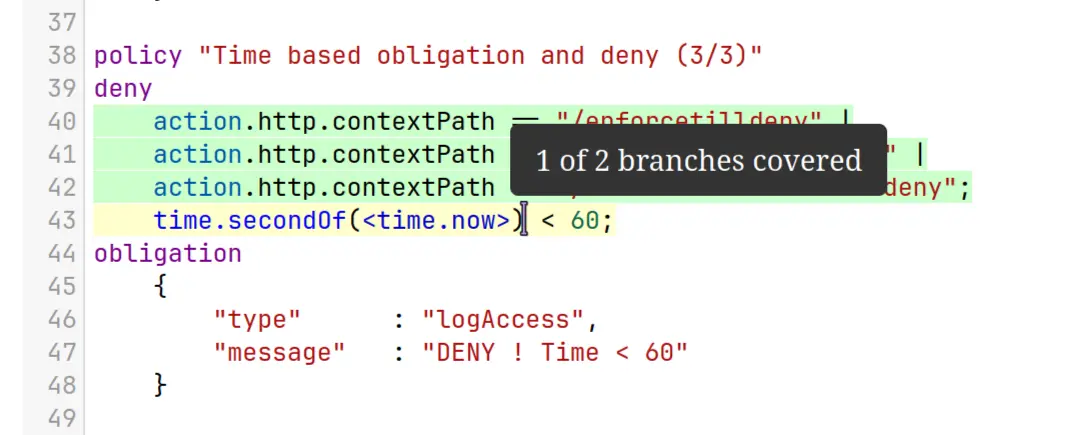
The --html flag (on by default) generates an interactive HTML report with line-by-line coverage highlighting:
sapl test --dir ./policies --output ./coverage
Each policy file gets a syntax-highlighted view with covered lines in green, partially covered lines in yellow, and uncovered lines in red. Hovering over a partially covered line shows branch detail.
For CI dashboards, the --sonar flag generates a SonarQube generic coverage XML report:
sapl test --dir ./policies --sonar --output ./coverage
This produces coverage/sonar/sonar-generic-coverage.xml which integrates directly with SonarQube’s coverage visualization. See the sapl-gitops-demo coverage report for a live example.
Maven plugin
For Java projects that embed the PDP, the sapl-maven-plugin provides the same coverage collection and quality gates as the CLI, integrated into the Maven lifecycle:
<plugin>
  <groupId>io.sapl</groupId>
  <artifactId>sapl-maven-plugin</artifactId>
  <configuration>
    <policyHitRatio>100</policyHitRatio>
    <policyConditionHitRatio>50</policyConditionHitRatio>
    <enableHtmlReport>true</enableHtmlReport>
    <enableSonarReport>false</enableSonarReport>
  </configuration>
  <executions>
    <execution>
      <id>coverage</id>
      <goals>
        <goal>enable-coverage-collection</goal>
        <goal>report-coverage-information</goal>
      </goals>
    </execution>
  </executions>
</plugin>
The .sapltest files are identical to the CLI approach. The plugin discovers them from the classpath and runs them as JUnit 5 tests during mvn verify. A programmatic Java fixture API is also available for cases where the DSL is not expressive enough. See the testing reference documentation for details.
Related
- Policy Operations: CI/CD pipeline with testing, signing, and deployment
- SDK Integrations: enforcement annotations and streaming modes
- Testing Reference: complete DSL reference, matchers, Java fixture API
- sapl-demos: 14 demo projects with
.sapltestfiles and a CLI test runner script