Spring Boot Method Security with SAPL
This guide walks through securing a Spring Boot application with SAPL. You will add policy-based authorization to JPA repository methods, write policies that enforce age restrictions, transform and filter query results based on user attributes, and implement constraint handlers for obligations.
The guide assumes basic familiarity with Spring Boot. For background on ABAC concepts and SAPL’s architecture, see the documentation.
The complete source code is available at github.com/heutelbeck/sapl-tutorial-01-spring.
Project Setup
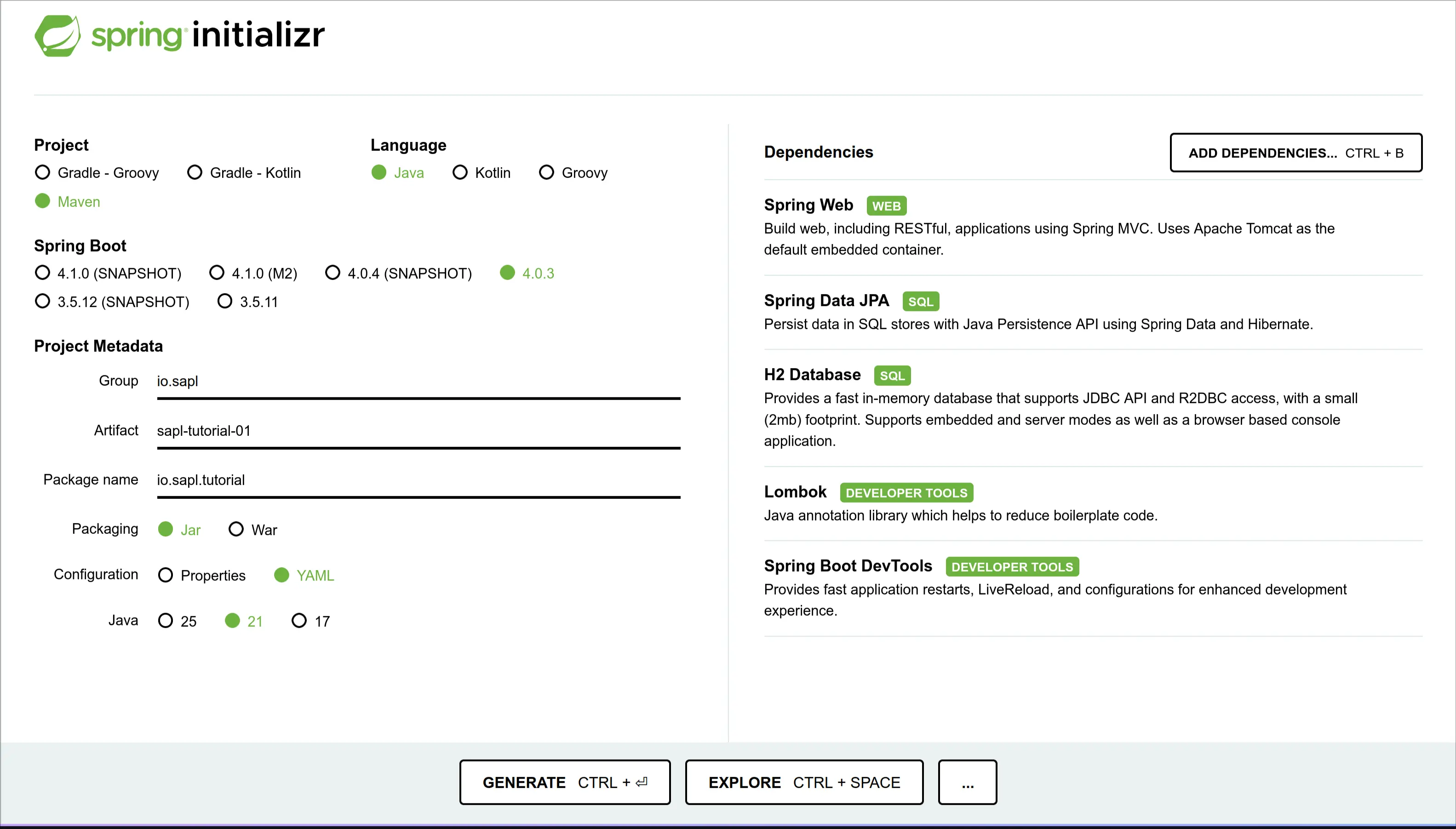
First, create a simple Spring Boot application. Open Spring Initializr and add the following dependencies:
- Spring Web (to provide a REST API for testing your application)
- Spring Data JPA (to develop the domain model for your application)
- H2 Database (as a simple in-memory database to support the application)
- Lombok (to eliminate some boilerplate code)
- Spring Boot DevTools (to improve the development process)
This tutorial uses Maven as the build tool and Java as the programming language.
Select Java 21 and Spring Boot 4.1.0 or newer in the Initializr.
Your Initializr settings should now look something like this:
Click “GENERATE.” Your browser will download the project template as a “.zip” file.
Unzip the project and import it into your preferred IDE.
Adding SAPL Dependencies
SAPL provides a bill of materials module that keeps SAPL module versions compatible. After adding the following block to your pom.xml, you do not need to declare the <version> of each SAPL dependency:
    <dependencyManagement>
        <dependencies>
            <dependency>
                <groupId>io.sapl</groupId>
                <artifactId>sapl-bom</artifactId>
                <version>4.1.2</version>
                <type>pom</type>
                <scope>import</scope>
            </dependency>
        </dependencies>
    </dependencyManagement>
An application using SAPL needs a Policy Decision Point (PDP) and one or more Policy Enforcement Points (PEPs). The PDP makes authorization decisions. You can embed it in your application, or run it as a dedicated server and delegate decisions to that remote service. This tutorial uses an embedded PDP that makes decisions locally from policies stored in the application resources. SAPL also integrates with Spring Security, so you can declare PEPs on Spring beans with annotations. Add the following starter dependency to your project:
    <dependency>
        <groupId>io.sapl</groupId>
        <artifactId>sapl-spring-boot-starter</artifactId>
    </dependency>
Released SAPL versions are available from Maven Central. For unreleased builds, add the Central Portal snapshots repository and use the matching x.y.z-SNAPSHOT version.
The current example uses Spring Boot 4.1.0 and SAPL 4.1.2. Spring Boot and SAPL versions are not coupled.
To use the Argon2 Password Encoder, add the following dependency:
    <dependency>
        <groupId>org.bouncycastle</groupId>
        <artifactId>bcpkix-jdk18on</artifactId>
        <version>1.84</version>
    </dependency>
Create a policies folder under src/main/resources, then create a file named pdp.json in that folder:
{
    "algorithm": {
        "votingMode": "PRIORITY_DENY",
        "defaultDecision": "DENY",
        "errorHandling": "PROPAGATE"
    },
    "variables": {}
}
The algorithm object selects the combining algorithm for resolving conflicting policy evaluation results. The three fields control orthogonal concerns:
votingModedetermines which decision type takes priority when both permit and deny votes are present.defaultDecisionis the fallback when no policy matches the subscription.errorHandlingcontrols what happens when policy evaluation errors occur (PROPAGATEmakes errors visible,ABSTAINsilently drops them).
This configuration is deliberately restrictive: deny takes priority, the default is deny, and errors propagate. This is the secure-by-default posture. You will write explicit permit policies to grant access.
The policies directory and pdp.json file are required for the embedded PDP to start. Without them, the application will fail during startup.
You can use the variables property to define environment variables, such as the configuration of Policy Information Points (PIPs). All policies can access the contents of these variables.
This file completes the basic Maven setup. You can now start implementing the application.
The Project Domain
The domain is a library where users can view a book only if they meet its minimum age requirement. If you are already familiar with Spring Boot, JPA, and Spring Security, skip ahead to Securing Repository Methods with SAPL.
Define the Book Entity and Repository
First, define a book entity that contains an ID, a name, an age rating, and content. You can use Lombok annotations to generate getters, setters, and constructors:
@Data
@Entity
@NoArgsConstructor
@AllArgsConstructor
public class Book {
    @Id
    Long id;
    String name;
    Integer ageRating;
    String content;
}
Define a matching repository interface. For now, include only findAll, findById, and save:
public interface BookRepository {
    List<Book> findAll();
    Optional<Book> findById(Long id);
    Book save(Book entity);
}
Define a matching repository bean so Spring Data can instantiate an implementation of your interface:
@Repository
// Important: interface order matters for detecting SAPL annotations.
public interface JpaBookRepository extends BookRepository, ListCrudRepository<Book, Long>  { }
We use ListCrudRepository instead of CrudRepository so that findAll() returns a List<Book> rather than Iterable<Book>. The constraint handler we will write later for filtering collections needs a recognizable container type to operate on.
Expose the Books with a REST Controller
Expose books through a simple REST controller. The Lombok @RequiredArgsConstructor annotation creates a constructor for dependency injection of the repository:
@RestController
@RequiredArgsConstructor
public class BookController {

    private final BookRepository repository;

    @GetMapping("/api/books")
    List<Book> findAll() {
        return repository.findAll();
    }

    @GetMapping("/api/books/{id}")
    Optional<Book> findById(@PathVariable Long id) {
        return repository.findById(id);
    }
}
Create a Custom LibraryUser Implementation
Now extend the User class from org.springframework.security.core.userdetails to create a custom LibraryUser implementation that contains the library user’s date of birth.
@ToString(callSuper = true)
@EqualsAndHashCode(callSuper = true)
public class LibraryUser extends User {

    @Getter
    private LocalDate birthday;

    public LibraryUser(String username, LocalDate birthday, String password) {
        super(username, password, true, true, true, true, List.of());
        this.birthday=birthday;
    }
}
To make sure the custom LibraryUser class is stored in the security context, implement a custom LibraryUserDetailsService. For this tutorial, a simple in-memory UserDetailsService is enough:
public class LibraryUserDetailsService implements UserDetailsService {

    Map<String, LibraryUser> users = new HashMap<>();

    public LibraryUserDetailsService(Collection<LibraryUser> users) {
        users.forEach(this::load);
    }

    public void load(LibraryUser user) {
        users.put(user.getUsername(), user);
    }

    @Override
    public UserDetails loadUserByUsername(String username) throws UsernameNotFoundException {
        var user = users.get(username);
        System.out.println("->"+user);
        if (user == null) {
            throw new UsernameNotFoundException("User not found");
        }
        return new LibraryUser(user.getUsername(), user.getBirthday(), user.getPassword());
    }
}
Create a Configuration Class
Create a SecurityConfiguration class with the Spring annotations @Configuration and @EnableWebSecurity. This class provides methods that are automatically processed in the context of Spring Security.
@Configuration
@EnableWebSecurity
public class SecurityConfiguration {

    @Bean
    SecurityFilterChain filterChain(HttpSecurity http) throws Exception {
        var clearSiteData = new HeaderWriterLogoutHandler(new ClearSiteDataHeaderWriter(Directive.ALL));
        // @formatter:off
        return http.authorizeHttpRequests(requests -> requests.anyRequest().authenticated())
                   .formLogin(login -> login.defaultSuccessUrl("/api/books", true))
                   .logout(logout -> logout.permitAll()
                           .logoutSuccessUrl("/login")
                           .addLogoutHandler(clearSiteData))
                   .build();
        // @formatter:on
    }

    @Bean
    static PasswordEncoder passwordEncoder() {
        return Argon2PasswordEncoder.defaultsForSpringSecurity_v5_8();
    }

    @Bean
    UserDetailsService userDetailsService(PasswordEncoder passwordEncoder) {
        return new LibraryUserDetailsService(DemoData.users(passwordEncoder));
    }
}
Generate Test Data on Application Startup
The default configuration with H2 and JPA creates a volatile in-memory database. To seed the database each time the application starts, create a CommandLineRunner. This class runs once the application context has loaded successfully:
@Component
@RequiredArgsConstructor
public class DemoData implements CommandLineRunner {

    public static final String DEFAULT_RAW_PASSWORD = "password";

    private final BookRepository bookRepository;

    @Override
    public void run(String... args) {
        // @formatter:off
        bookRepository.save(new Book(1L, "Clifford: It's Pool Time!",                                  0, "*Woof*"));
        bookRepository.save(new Book(2L, "The Rescue Mission: (Pokemon: Kalos Reader #1)",             4, "Gotta catch 'em all!"));
        bookRepository.save(new Book(3L, "Dragonlance Chronicles Vol. 1: Dragons of Autumn Twilight",  9, "Some fantasy story."));
        bookRepository.save(new Book(4L, "The Three-Body Problem",                                    14, "Space is scary."));
        // @formatter:on
    }

    private static LocalDate birthdayForAgeInYears(int age) {
        return LocalDate.now().minusYears(age).minusDays(20);
    }

    public static Collection<LibraryUser> users(PasswordEncoder encoder) {
        var users = new LinkedList<LibraryUser>();
        // @formatter:off
        users.add(new LibraryUser("zoe",   birthdayForAgeInYears(17), encoder.encode(DEFAULT_RAW_PASSWORD)));
        users.add(new LibraryUser("bob",   birthdayForAgeInYears(10), encoder.encode(DEFAULT_RAW_PASSWORD)));
        users.add(new LibraryUser("alice", birthdayForAgeInYears(3),  encoder.encode(DEFAULT_RAW_PASSWORD)));
        // @formatter:on
        return users;
    }
}
The application domain is complete, and you can test the application. Build it with mvn clean install, then run it with mvn spring-boot:run on the command line or with a run configuration in your IDE.
After the application starts, go to http://localhost:8080/api/books. The browser redirects you to the login page. Use one of the users above to log in. You should see a list of all books:
[
    {
        "id"       : 1,
        "name"     : "Clifford: It's Pool Time!",
        "ageRating": 0,
        "content"  : "*Woof*"
    },
    {
        "id"       : 2,
        "name"     : "The Rescue Mission: (Pokemon: Kalos Reader #1)",
        "ageRating": 4,
        "content"  : "Gotta catch 'em all!"
    },
    {
        "id"       : 3,
        "name"     : "Dragonlance Chronicles Vol. 1: Dragons of Autumn Twilight",
        "ageRating": 9,
        "content"  : "Some fantasy story."
    },
    {
        "id"       : 4,
        "name"     : "The Three-Body Problem",
        "ageRating": 14,
        "content"  : "Space is scary."
    }
]
So far, this tutorial has not used any features of SAPL, and you just created a basic Spring Boot application. Note that we did not explicitly add any dependency on Spring Security. The SAPL Spring integration has a transitive dependency on Spring Security, which activated it for the application.
Securing Repository Methods with SAPL
Setting Up Method Security
SAPL extends Spring Security’s method security features. To activate SAPL method security for individual authorization decisions, add the @EnableSaplMethodSecurity annotation to your SecurityConfiguration class.
@Configuration
@EnableWebSecurity
@EnableSaplMethodSecurity
public class SecurityConfiguration {
    ...
}
Add the First PEP
The SAPL Spring Boot integration uses annotations to add PEPs to methods and classes. This tutorial uses the two variants @PreEnforce and @PostEnforce. Depending on the annotation, the PEP runs before or after method execution. As a first example, add @PreEnforce to the findById method of the BookRepository interface:
public interface BookRepository {
    List<Book> findAll();

    @PreEnforce
    Optional<Book> findById(Long id);

    Book save(Book entity);
}
Enable Console Output
Add io.sapl.pdp.embedded.print-text-report=true to your application.properties file. The text report logs each PDP decision with the subscription, decision outcome, and which policy documents matched. You can also select ...print-json-report for a machine-readable variant or ...print-trace for a full evaluation trace including attribute resolution. print-trace is the most fine-grained explanation and is only recommended as a last resort for troubleshooting.
The text report output looks like this:
[...] : === PDP Decision ===
[...] : Timestamp      : 2026-05-18T12:37:50.445117683+02:00
[...] : Subscription Id: 75372bed-5eb6-5560-0d86-bcaf2f6f2ed1
[...] : Subscription   : { ... }
[...] : Decision       : PERMIT
[...] : PDP ID         : default
[...] : Documents:
[...] :   policy-name -> PERMIT
For each decision, you see which documents were evaluated and their individual outcomes. For policy sets, sub-policy results are listed under the set name. If a policy resolved attributes from Policy Information Points during evaluation, those values appear under an Attributes: block per document. Obligations and advice are listed when present in the decision.
For additional debug output, e.g., which policy documents are loaded at startup, you can use logging.level.io.sapl=DEBUG in your application.properties.
Restart the application, log in, and navigate to http://localhost:8080/api/books/1. You should now see an error page including the statement: There was an unexpected error (type=Forbidden, status=403).
Inspect the console to see what happened behind the scenes. The logs should contain statements similar to the following:
[...] : === PDP Decision ===
[...] : Timestamp      : 2026-05-18T12:36:42.66151139+02:00
[...] : Subscription Id: ebd3533d-853e-3b48-de3e-0f2af18cc21a
[...] : Subscription   : { ... large JSON object ... }
[...] : Decision       : DENY
[...] : PDP ID         : default
The log contains the authorization subscription (a large JSON object), the decision made by the PDP, a timestamp, and the PDP identifier. The decision is DENY because no policies exist yet and the combining algorithm defaults to deny.
The subscription is not very readable in the log. Let us apply some formatting to unpack the key parts of the subscription object:
{
    "subject": {
        "authenticated": true,
        "authorities": [
            { "authority": "FACTOR_PASSWORD", "issuedAt": "2026-05-18T10:36:34.779859396Z" }
        ],
        "details": {
            "remoteAddress": "0:0:0:0:0:0:0:1",
            "sessionId": "BF0DB11C0B258C8E83E01D8367A2D323"
        },
        "name": "zoe",
        "principal": {
            "username": "zoe",
            "birthday": "2009-04-28",
            "accountNonExpired": true,
            "accountNonLocked": true,
            "authorities": [],
            "credentialsNonExpired": true,
            "enabled": true
        }
    },
    "action": {
        "http": {
            "method": "GET",
            "url": "http://localhost:8080/api/books/1",
            "scheme": "http",
            "host": "localhost",
            "port": 8080,
            "path": "/api/books/1",
            "contextPath": "",
            "applicationPath": "/api/books/1",
            "isSecure": false,
            "client": { "address": "0:0:0:0:0:0:0:1", "host": "0:0:0:0:0:0:0:1", "port": 54408 },
            "server": { "address": "0:0:0:0:0:0:0:1", "host": "localhost", "port": 8080 },
            "headers": { "host": ["localhost:8080"], "user-agent": ["curl/8.18.0"], "accept": ["*/*"], "cookie": ["JSESSIONID=..."] },
            "cookies": [ { "name": "JSESSIONID", "value": "..." } ],
            "characterEncoding": "UTF-8"
        },
        "java": {
            "name": "findById",
            "declaringTypeName": "io.sapl.tutorial.domain.BookRepository",
            "modifiers": ["public"],
            "instanceof": [ ... ],
            "arguments": [1]
        }
    },
    "resource": {
        "http": { ... },
        "java": { ... }
    }
}
Note: Spring Security 7 automatically adds a FACTOR_PASSWORD authority to the authentication when the user logs in with a password. This is part of the multi-factor authentication framework.
Without any specific configuration, the subscription is a large object with significant redundancies. The SAPL engine and Spring integration do not have domain knowledge about the application, so the PEP gathers any information it can find that could reasonably describe the subject, action, and resource in an authorization subscription.
By default, the PEP attempts to marshal the Authentication object from Spring’s SecurityContext directly into a JSON object for the subject. This is a reasonable approach in most cases, and as you can see, subject.principal.birthday contains the data you previously defined for the custom LibraryUser class and is made available to the PDP.
The action and resource objects are almost identical. Without domain knowledge, the PEP can only gather technical information from the application context.
Let’s begin with the action and its associated Java information. The PEP can use the names and types of protected classes and methods to describe the action. For example, the method name findById can be treated as a verb that describes the action, while the argument 1 is an attribute of that action.
At the same time, the argument 1 can also be interpreted as the resource’s ID. The PEP does not know which Java context values are relevant to the application, so it adds all information it can gather to the action and resource.
If the protected method runs as part of an HTTP request, that request can also describe the action or resource. For example, the HTTP method GET can describe the action, while the URL naturally identifies a resource.
This kind of subscription object is wasteful. Later, you will learn how to customize the subscription so it is more compact and better aligned with your application domain. For now, keep the default configuration.
Storing SAPL Policies for an Embedded PDP
The console log shows that the PDP did not find any policy document matching the authorization subscription because no policy exists yet. With an embedded PDP, policies can be stored alongside the application’s resources or somewhere on the host’s filesystem. Policies in the application resources are static at runtime once the application has been built and started. Policies on the filesystem are monitored by the PDP, and changes can take effect at runtime.
The default configuration of an embedded PDP is the first option, so the application’s policies are currently embedded in the resources.
To use filesystem based policies, add io.sapl.pdp.embedded.pdp-config-type = DIRECTORY to the application.properties file.
The pdp.json file and the policies can be stored in different folders. Configure the pdp.json location with io.sapl.pdp.embedded.config-path and the policy location with io.sapl.pdp.embedded.policies-path. Both properties require a valid filesystem path to the folder that contains the files.
Note: \ within the path must be replaced by /, e.g., C:\Users by C:/Users.
Creating SAPL Policies
Basic Information
The stored policy documents must adhere to some rules:
- The SAPL PDP will only load documents that have the suffix
.sapl. - Each document contains exactly one policy or one policy set.
- The top-level policies and policy sets must have unique names across all documents.
- All
.sapldocuments must be syntactically correct, or the PDP may fall back to a default decision determined by the algorithm given in thepdp.jsonconfiguration.
A SAPL policy document contains the following minimum elements:
- The keyword
policy, declaring that the document contains a policy. You will learn about policy sets later. - A unique policy name so that the PDP can distinguish it from other policies.
- The entitlement keyword, either
permitordeny, which determines the decision result the PDP returns when the policy is applicable and its body evaluates totrue.
Other optional elements will be explained later.
First SAPL Policies: Permit All or Deny All
The most basic policies either permit or deny all actions without inspecting any attributes.
Start with a “permit all” policy. Add a file permit_all.sapl to the resources/policies folder of the Maven project with the following contents:
policy "permit all" permit
As described above, the document starts with the keyword policy, which indicates that the document contains a policy. This keyword is followed by the policy name as a string, in this case "permit all". The policy name is followed by the entitlement, in this case permit.
In this guide, we haven’t described any rules in the policy. Therefore, all of its rules are satisfied, and the policy tells the PDP to return a permit decision, regardless of any details of the attributes contained in the authorization subscription or any external attributes from PIPs. This type of policy is dangerous and not very practical for production systems. However, it is helpful during development to be able to perform quick tests without authorization getting in the way.
Restart the application, authenticate with any user, and access http://localhost:8080/api/books/1 again.
Now you should get the data for book 1:
{
    "id"        : 1,
    "name"      : "Clifford: It's Pool Time!",
    "ageRating" : 0,
    "content"   : "*Woof*"
}
The log should look like this:
[...] : === PDP Decision ===
[...] : Subscription   : { ... }
[...] : Decision       : PERMIT
[...] : PDP ID         : default
[...] : Documents:
[...] :   permit all -> PERMIT
The log shows that the PDP found one matching policy document (permit all) and it evaluated to PERMIT. Since this is the only policy and it has no conditions, the "permit all" policy always matches and always returns its entitlement.
Since this is the only matching document and it returns permit, the PDP returns PERMIT. The PEP then allows the repository method to execute.
Create a “deny all” policy alongside it. Add a file deny_all.sapl to the resources/policies folder:
policy "deny all" deny
Restart the application, authenticate with any user, and access http://localhost:8080/api/books/1 again.
The application denies access. The log shows both policies matched, but the PRIORITY_DENY combining algorithm gives precedence to the deny decision:
[...] : === PDP Decision ===
[...] : Subscription   : { ... }
[...] : Decision       : DENY
[...] : PDP ID         : default
[...] : Documents:
[...] :   permit all -> PERMIT
[...] :   deny all -> DENY
This is the secure-by-default behavior: when both permit and deny are present, deny wins. The SAPL engine implements several combining algorithms to resolve conflicting decisions (see SAPL Documentation: Combining Algorithms).
The three fields in the pdp.json algorithm configuration control orthogonal concerns: votingMode determines priority between permit and deny, defaultDecision is the fallback when no policy matches, and errorHandling controls whether evaluation errors propagate or are silently absorbed.
Rename deny_all.sapl to deny_all.sapl.off and permit_all.sapl to permit_all.sapl.off. After renaming, rebuild with mvn clean compile before restarting. The clean is needed because compiled resources in the target/ directory are not removed by a regular build. Without it, the old .sapl files remain on the classpath and the PDP still loads them. Access to the book should now be denied because the PDP only loads documents with the .sapl suffix and no matching policies remain.
The PDP may also return INDETERMINATE if an error occurred during policy evaluation. The PEP denies access for every decision except an explicit PERMIT. Additional information about the different results of a policy evaluation can be found in the SAPL documentation.
In this section, you learned how a PEP and PDP interact in SAPL and how the PDP combines outcomes of different policies. In the next step, you will learn how to write more practical policies and exactly when a policy is applicable to an authorization subscription.
Create Domain-Specific Policies
First, add a @PreEnforce PEP to the findAll method of the BookRepository:
public interface BookRepository {

    @PreEnforce
    List<Book> findAll();

    @PreEnforce
    Optional<Book> findById(Long id);

    Book save(Book entity);
}
Let’s write a policy from the natural language statement “Only Bob can see individual book entries”. Starting from natural language is useful because it makes the intended rule explicit before you encode it in SAPL. Create a policy document permit_bob_for_books.sapl in the policies folder under resources, and translate the statement into a SAPL policy document as follows:
policy "only bob may see individual book entries"
permit
    action.java.name == "findById" & action.java.declaringTypeName =~ ".*BookRepository$";
    subject.name == "bob";
Now rebuild with mvn clean compile (clean is needed to remove any previously compiled .sapl.off files from the target directory), restart, and log in as Bob. You should see an error page with status 403. This happens because the login redirects to /api/books which calls findAll, and no policy matches that method.
Now access an individual book directly at http://localhost:8080/api/books/1. Access will be granted, and the log looks like this:
[...] : === PDP Decision ===
[...] : Subscription   : { ... }
[...] : Decision       : PERMIT
[...] : PDP ID         : default
[...] : Documents:
[...] :   only bob may see individual book entries -> PERMIT
Now go to http://localhost:8080/logout and log out. Then log in as Zoe and try to access http://localhost:8080/api/books/1.
The application denies access:
[...] : === PDP Decision ===
[...] : Subscription   : { ... }
[...] : Decision       : DENY
[...] : PDP ID         : default
The PDP’s decision-making process now looks different. First, examine why there are no applicable documents when accessing /api/books or after a successful login.
If you look at the policy, the conditions following permit contain two rules separated by semicolons. The first condition action.java.name == "findById" & action.java.declaringTypeName =~ ".*BookRepository$" acts as a scoping rule that determines if the policy is relevant to the given authorization subscription. The PDP only evaluates the remaining conditions if this first condition is true. As seen in the "permit all" example, if no conditions are present, the policy always applies.
In this case, the target expression examines two attributes of the action in the subscription. It checks whether action.java.name is equal to "findById" and whether action.java.declaringTypeName matches the regular expression ".*BookRepository$". In other words, the attribute string must end with BookRepository. SAPL uses the regex comparison operator =~ for this check.
Note: In the authorization subscription JSON, nested objects appear as object values inside other objects. In SAPL policy expressions, you navigate these nested structures with dot notation. For example, "action": {"java": {"name": "findById"}} in the subscription becomes action.java.name in the policy.
These two expressions explain why the PDP has identified the policy document "permit_bob_for_books.sapl" as applicable when accessing individual books, but does not find a matching document when accessing the entire list.
Note that SAPL distinguishes between lazy Boolean operators, && and || for AND and OR, and eager Boolean operators, & and |. Target expressions only allow eager operators, a requirement for efficient indexing of larger policy sets.
The PDP evaluates the complete policy when the user attempts to access the individual book. The policy body is the list of conditions following permit or deny. It contains an arbitrary number of rules or variable assignments, each ending with the SAPL statement terminator. Each rule is a Boolean expression. The body as a whole evaluates to true when all of its rules evaluate to true. Rules are evaluated lazily from top to bottom.
In the situations above, the rule checking Bob’s name is only true when Bob is accessing the book.
In this section, you have learned when a SAPL document is applicable and how the conditions in the policy body determine the authorization decision.
Next, you will learn how to customize the authorization subscription and use temporal functions to only grant access to age-appropriate books.
Enforce the Age Rating of Individual Books
Before continuing, deactivate all existing policies in your project by deleting them or appending the .off suffix to the filename.
The goal of this section is to grant access only to books appropriate for the user’s age. To make this decision, the PDP needs the user’s date of birth (attribute of the subject), the book’s age rating (attribute of the resource), and the current date (attribute of the environment). When you examine the authorization subscription sent in the previous examples, you will notice that only the user’s date of birth is currently available in the subscription. How can we make the other attributes available for the PDP in the policies?
Generally, there are two potential sources for attributes: the authorization subscription or Policy Information Points (PIPs).
Consider the age rating of the book. This information is not known to the PEP before executing the query. Therefore, in the BookRepository, replace the @PreEnforce on findById with a @PostEnforce annotation as follows:
public interface BookRepository {

    @PreEnforce
    List<Book> findAll();

    @PostEnforce(subject  = "authentication.getPrincipal()",
                 action   = "'read book'",
                 resource = "returnObject")
    Optional<Book> findById(Long id);

    Book save(Book entity);
}
This annotation changes the enforcement flow:
- Invoke the method first.
- Construct a custom authorization subscription with Spring Expression Language (SpEL).
- Subscribe to the PDP with the custom authorization subscription.
- Enforce the decision.
When we inspected the original automatically generated authorization subscription, the resulting object was relatively large and technical. Here, the parameters of the @PostEnforce annotation help create a more precise authorization subscription that matches the application domain.
The parameter subject = "authentication.getPrincipal()" extracts the principal object from the authentication object and uses it as the subject object in the subscription.
The parameter action = "'read book'" sets the action object in the subscription to the string constant read book.
Finally, the parameter resource = "returnObject" sets the resource object in the subscription to the method invocation result. Because this resource is the book entity, it automatically contains its ageRating attribute.
After identifying these objects, the PEP uses the ObjectMapper in the Spring application context to serialize the objects to JSON.
The resulting authorization subscription will look similar to this:
{
    "subject": {
        "username": "zoe",
        "birthday": "2009-04-28",
        "password": null,
        "accountNonExpired": true,
        "accountNonLocked": true,
        "authorities": [],
        "credentialsNonExpired": true,
        "enabled": true
    },
    "action": "read book",
    "resource": {
        "id": 1,
        "name": "Clifford: It's Pool Time!",
        "ageRating": 0,
        "content": "*Woof*"
    }
}
This authorization subscription is much more manageable and practical than the automatic guesswork the Spring integration performs without any customization.
The policy we will write to enforce the book age restriction will introduce a number of new concepts:
- Definition of local attribute variables
- Use of Policy Information Points
- Function libraries
Create a policy document check_age.sapl as follows:
policy "check age"
permit
    action == "read book";
    var birthday  = subject.birthday;
    var today     = time.dateOf(|<time.now>);
    var age       = time.timeBetween(birthday, today, "years");
    age >= resource.ageRating;
In its first condition, the policy check age scopes its applicability to all authorization subscriptions with the action read book.
The policy then defines a local attribute variable named birthday and assigns it to the subject.birthday attribute.
The next line assigns the current date to the variable today. In SAPL, angled brackets <ATTRIBUTE_IDENTIFIER> denote an attribute stream. This is a subscription to an external attribute source provided by a Policy Information Point (PIP). In this case, the identifier time.now accesses the current time in UTC from the system clock.
In this guide, we do not need a stream of time updates. We only need the first event in the attribute stream. Prepending the pipe symbol to the angled brackets |<> takes the first event and then unsubscribes from the PIP. The time libraries in SAPL use ISO 8601 strings to represent time. The function time.dateOf then extracts the date component of the timestamp retrieved from the PIP.
The policy calculates the subject’s age in years using the time.timeBetween function and the defined variables.
The engine evaluates variable assignment rules from top to bottom. Each rule has access to variables defined above it. Assignment rules evaluate to true unless an error occurs during evaluation.
Finally, the policy compares age with resource.ageRating. The condition evaluates to true when the subject’s age is at least the book’s age rating.
For example, if you log in as Zoe and access the first book, the logs will show:
[...] : === PDP Decision ===
[...] : Subscription   : { ... }
[...] : Decision       : PERMIT
[...] : PDP ID         : default
[...] : Documents:
[...] :   check age -> PERMIT
[...] :     Attributes:
[...] :       <time.now> = "2026-05-18T10:39:42.599004238Z" @ 2026-05-18T12:39:42.601684543+02:00
Below each policy that resolved an external attribute, the report lists the attribute value the PDP saw during evaluation. This is part of the print-text-report output and is independent of print-trace.
However, if Alice attempts to access book four, access is denied because the age condition evaluates to false and the policy is not applicable:
[...] : === PDP Decision ===
[...] : Subscription   : { ... }
[...] : Decision       : DENY
[...] : PDP ID         : default
[...] : Documents:
[...] :   check age -> NOT_APPLICABLE
[...] :     Attributes:
[...] :       <time.now> = "2026-05-18T10:39:43.777712367Z" @ 2026-05-18T12:39:43.778336567+02:00
The policy can be written more compactly using an import statement:
import time.timeBetween
import time.dateOf
policy "check age compact"
permit
    action == "read book";
    var age = timeBetween(subject.birthday, dateOf(|<time.now>), "years");
    age >= resource.ageRating;
Imports let you use a shorter name instead of the fully qualified name of functions stored in SAPL libraries.
For instance, the statement import time.timeBetween imports the timeBetween function from the time library, making it available under its simple name. You can also import individual attribute finders or use 'library name' as 'alias' for aliasing.
Transform and Constrain Outputs with SAPL Policies
In this part of the tutorial, you will use policies to change query results and trigger side effects with constraints.
SAPL can attach constraints to an authorization decision. A constraint tells the PEP to do additional work while enforcing that decision. SAPL distinguishes three constraint types:
- Obligation: a mandatory instruction. If the PEP cannot fulfill it, it must not grant access.
- Advice: an optional instruction. If the PEP cannot fulfill it, the original authorization decision still stands.
- Transformation: a special form of obligation in which the PEP must replace the accessed resource with the resource object supplied in the authorization decision.
For a PERMIT decision, unresolved obligations prevent the PEP from granting access. Unresolved advice does not.
For example, any doctor may access a patient’s medical record in an emergency. However, the system must log access if the doctor is not the attending doctor of that patient, triggering an audit process. This is often called a “break glass” scenario.
Use Transformations in SAPL Policies
The Book entity already includes a content field. We want to change the library policies so that users who are too young for a book are not denied access outright. Instead, only the content of the requested book should be masked. To implement this change, add the following check_age_transform.sapl policy document to the application’s policies:
import time.timeBetween
import time.dateOf
import filter.blacken
policy "check age transform"
permit
    action == "read book";
    var age = timeBetween(subject.birthday, dateOf(|<time.now>), "years");
    age < resource.ageRating;
transform
    resource |- {
        @.content : blacken(3,0,"\u2588")
    }
This policy introduces the transform expression.
If the policy body evaluates to true, the JSON value produced by the transform statement is added to the authorization decision as the resource property. That property tells the PEP to return the supplied replacement resource instead of the original method result. It does not modify the stored book entity.
In this case, the filter operator |- is applied to the resource object. The filter operator selects individual parts of a JSON value for manipulation, for example by applying a function to the selected value. Here, the operator selects the content key of the resource and replaces it with a version that leaves only the first three characters visible and replaces the rest with a black square (“\u2588” in Unicode). The selection expression is powerful. See the SAPL Documentation for a full explanation.
Ensure that the original age checking policy is still in place. Restart and log in as Alice.
When accessing http://localhost:8080/api/books/1, you will get:
{
    "id"        : 1,
    "name"      : "Clifford: It's Pool Time!",
    "ageRating" : 0,
    "content"   : "*Woof*"
}
Alice is only three years old. When she requests the book at http://localhost:8080/api/books/4, the content is masked because she is too young to read it:
{
    "id"        : 4,
    "name"      : "The Three-Body Problem",
    "ageRating" : 14,
    "content"   : "Spa████████████"
}
The logs for this access attempt look like this:
[...] : === PDP Decision ===
[...] : Subscription   : { ... }
[...] : Decision       : PERMIT
[...] : PDP ID         : default
[...] : Resource: {"id"=4, "name"="The Three-Body Problem", "ageRating"=14, "content"="Spa████████████"}
[...] : Documents:
[...] :   check age transform -> PERMIT
[...] :     Attributes:
[...] :       <time.now> = "2026-05-18T10:40:26.725343696Z" @ 2026-05-18T12:40:26.72610141+02:00
[...] :   check age -> NOT_APPLICABLE
[...] :     Attributes:
[...] :       <time.now> = "2026-05-18T10:40:26.725343696Z" @ 2026-05-18T12:40:26.72610141+02:00
Both policy documents are evaluated for the subscription. The check age policy evaluates to NOT_APPLICABLE because Alice is not old enough to read “The Three-Body Problem”. The check age transform policy evaluates to PERMIT with a transformed resource. As a result, the PEP replaces the original resource with the one from the decision, which contains the masked content.
Use Obligations and Advice in SAPL Policies
The check age transform policy with the transform statement was the first example of a policy that instructs the PEP to grant access only if additional statements are enforced at the same time.
Now add an obligation to this policy. The system should also log requests for books that the user is too young to read. This gives parents an opportunity to discuss the book with their children first.
To do so, modify the check_age_transform.sapl policy as follows:
import time.timeBetween
import time.dateOf
import filter.blacken
policy "check age transform"
permit
    action == "read book";
    var age = timeBetween(subject.birthday, dateOf(|<time.now>), "years");
    age < resource.ageRating;
obligation
    {
        "type": "logAccess",
        "message": "Attention, "+subject.username+" accessed the book '"+resource.name+"'."
    }
transform
    resource |- {
        @.content : blacken(3,0,"\u2588")
    }
Now log in as Alice and attempt to access http://localhost:8080/api/books/2.
Access will be denied, and the logs look as follows:
[...] : === PDP Decision ===
[...] : Subscription   : { ... }
[...] : Decision       : PERMIT
[...] : PDP ID         : default
[...] : Obligations: [{"type"="logAccess", "message"="Attention, alice accessed the book 'The Rescue Mission: (Pokemon: Kalos Reader #1)'."}]
[...] : Resource: {"id"=2, "name"="The Rescue Mission: (Pokemon: Kalos Reader #1)", "ageRating"=4, "content"="Got█████████████████"}
[...] : Documents:
[...] :   check age transform -> PERMIT
[...] :   check age -> NOT_APPLICABLE
The PDP returned PERMIT, but the PEP still denied access because the authorization decision contained a logging obligation. SAPL represents obligations and advice as JSON objects, and the application must provide handlers for the constraint types it uses. Because no handler could understand and enforce the logging obligation yet, the PEP denied access.
To support the logging obligation, implement a constraint handler provider:
@Slf4j
@Service
public class LoggingConstraintHandlerProvider implements ConstraintHandlerProvider {

    private static final String CONSTRAINT_TYPE  = "logAccess";
    private static final int    DEFAULT_PRIORITY = 50;

    @Override
    public List<ScopedConstraintHandler> getConstraintHandlers(Value constraint, Set<SignalType> supportedSignals) {
        var signalOpt = ConstraintHandlerProvider.constraintTypeAndSignal(constraint, CONSTRAINT_TYPE,
                supportedSignals, DecisionSignal.SIGNAL_TYPE);
        if (signalOpt.isEmpty()) {
            return List.of();
        }
        Runner runner = runnerFor(constraint);
        return List.of(new ScopedConstraintHandler(runner, signalOpt.get(), DEFAULT_PRIORITY));
    }

    private static Runner runnerFor(Value constraint) {
        var message = ConstraintHandlerProvider.stringField(constraint, "message").orElse("Access logged");
        return () -> log.info(message);
    }
}
The SAPL Spring integration delivers constraint handlers through signals fired at well-defined points in the PEP lifecycle. Examples of signals are DecisionSignal (the moment the decision arrives at the PEP), OutputSignal (per emitted result of the protected method), and a few HTTP-specific signals if the PEP is sitting on an HTTP path. Each provider declares which signal or signals its handlers attach to and at what priority.
A ConstraintHandlerProvider is the single interface every provider implements. Its only method, getConstraintHandlers, receives the constraint value and the set of signal types the deployed PEP actually fires. The provider returns an empty list when it does not recognize the constraint, or a non-empty list of ScopedConstraintHandler entries when it does. Each entry pairs a handler with the signal type it attaches to and a priority that orders execution. A single provider may return several entries for different signals if one constraint drives coordinated handlers across the lifecycle.
The handler itself comes in three forms, expressed as sealed sub-interfaces of ConstraintHandler:
Runneris aRunnablefor fire-and-forget side effects (logging, audit emission).Consumer<T>observes a typed signal value without changing it (inspect the decision, peek at an emitted item).Mapper<T>is aUnaryOperator<T>that transforms a signal value (rewrite a response body, filter a returned collection).
In the case of logging, the handler is a side effect attached to the DecisionSignal. The static helper ConstraintHandlerProvider.constraintTypeAndSignal combines two checks: the constraint must be of the expected type, and the deployed PEP must fire the expected signal. The provider returns a Runner that prints the obligation’s message field through SLF4J.
After logging in as Alice and accessing http://localhost:8080/api/books/2, access is granted, and the logs now contain the following line:
[...] : Attention, alice accessed the book 'The Rescue Mission: (Pokemon: Kalos Reader #1)'.
Let’s try another example of an obligation.
After a successful login, /api/books is still denied because we have not yet implemented a policy for the findAll method. We need a policy that lets the user list age-appropriate books. This time, we do not replace the resource with a transform instruction. In a real library, that could require the PEP to process hundreds of records. Instead, we instruct the PEP to return only certain books.
First, complete the @PreEnforce on findAll in the BookRepository as follows:
public interface BookRepository {

    @PreEnforce(subject = "authentication.getPrincipal()",
                action  = "'list books'")
    List<Book> findAll();

    @PostEnforce(subject  = "authentication.getPrincipal()",
                 action   = "'read book'",
                 resource = "returnObject")
    Optional<Book> findById(Long id);

    Book save(Book entity);
}
The idea is the same as for the findById method. The parameter subject = "authentication.getPrincipal()" extracts the principal object and uses it as the subject object in the subscription. The parameter action = "'list books'" sets the action object to the string list books. Because @PreEnforce runs before the method, there is no return value yet. The PEP leaves the resource absent or derives it from the available context.
To return only accessible books, write a policy as follows:
import time.timeBetween
import time.dateOf
policy "filter content in collection"
permit
    action == "list books";
obligation
    {
        "type" : "jsonContentFilterPredicate",
        "conditions" : [
            {
                "path" : "$.ageRating",
                "type" : "<=",
                "value" : timeBetween(subject.birthday, dateOf(|<time.now>), "years")
            }
        ]
    }
We use the ContentFilterPredicateProvider class that is already provided in the SAPL engine. This class filters a JSON object and extracts nodes that match the specified conditions.
The obligation selects this provider with the assignment "type" : "jsonContentFilterPredicate". The conditions field then specifies one or more conditions to check. Here, the provider checks the array for JSON nodes that contain the ageRating element and whose age rating is less than or equal to the age of the accessing user. Only matching nodes remain in the response.
If you need custom behavior, you can implement your own constraint handler provider:
@Service
public class FilterByAgeProvider implements ConstraintHandlerProvider {

    private static final String CONSTRAINT_TYPE  = "filterBooksByAge";
    private static final int    DEFAULT_PRIORITY = 10;

    @Override
    public List<ScopedConstraintHandler> getConstraintHandlers(Value constraint, Set<SignalType> supportedSignals) {
        if (!ConstraintHandlerProvider.constraintIsOfType(constraint, CONSTRAINT_TYPE)) {
            return List.of();
        }
        if (!(constraint instanceof ObjectValue obj) || !(obj.get("age") instanceof NumberValue ageValue)) {
            return List.of();
        }
        final int maxAge = ageValue.value().intValue();
        return SignalType.findIn(supportedSignals, Signal.OutputSignal.class).map(outputSignal -> {
            Mapper<Object> mapper = books -> filterBooks(books, maxAge);
            return List.of(new ScopedConstraintHandler(mapper, outputSignal, DEFAULT_PRIORITY));
        }).orElseGet(List::of);
    }

    private static Object filterBooks(Object value, int maxAge) {
        if (!(value instanceof Iterable<?> iterable)) {
            return value;
        }
        var result = new ArrayList<Book>();
        for (var item : iterable) {
            if (item instanceof Book book && book.getAgeRating() <= maxAge) {
                result.add(book);
            }
        }
        return result;
    }
}
The shape mirrors the logging provider, but the handler is now a Mapper<Object> attached to the OutputSignal. OutputSignal is the per-result signal the PEP fires once the protected method has produced its return value. A Mapper transforms that value before the PEP releases it. SignalType.findIn searches the deployed PEP’s signal set for an OutputSignal of any value type. Because findAll returns List<Book> (see the JpaBookRepository change earlier in the tutorial), the deployed PEP fires an OutputSignal whose value type is the list, and our Mapper receives the populated list at runtime.
The mapper applies the age predicate and returns a new ArrayList<Book> containing only the entries the subject is permitted to see. If no entries match, returning an empty List<Book> is acceptable because the policy on findAll already permitted the request. The obligation only narrows the result set. The mapper leaves the original list unmodified and returns a filtered copy.
Now log in as Bob, and you will see the following list of books:
[
    {
        "id": 1,
        "name": "Clifford: It's Pool Time!",
        "ageRating": 0,
        "content": "*Woof*"
    },
    {
        "id": 2,
        "name": "The Rescue Mission: (Pokemon: Kalos Reader #1)",
        "ageRating": 4,
        "content": "Gotta catch 'em all!"
    },
    {
        "id": 3,
        "name": "Dragonlance Chronicles Vol. 1: Dragons of Autumn Twilight",
        "ageRating": 9,
        "content": "Some fantasy story."
    }
]
Create a Policy Set
A SAPL policy set groups policies and evaluates them with its own combining algorithm. The set result is then combined with results from other top-level policies or policy sets. Policy sets use the same family of algorithms as final conflict resolution, including the first or abstain errors propagate algorithm.
Note: In contrast to the pdp.json file, the algorithms in policy sets must be written in lowercase natural language form.
A SAPL policy set consists of the following elements:
- the keyword
set, declaring that the document contains a policy set - a unique policy set name, so that the PDP can distinguish it from other policy sets
- a combining algorithm
- an optional target expression
- optional variable assignments
- two or more policies
As a small example, create a file check_age_by_id_set.sapl. Only one of the two policies from the previous section, 'check age compact' and 'check age transform', can be applicable at a time. Therefore, let’s create a policy set that processes both policies.
import time.dateOf
import time.timeBetween
import filter.blacken

set "check age set"
first or abstain errors propagate
for action == "read book"
var birthday    = subject.birthday;
var today       = dateOf(|<time.now>);
var age         = timeBetween(birthday, today, "years");

    policy "check age transform set"
    permit
        age < resource.ageRating;
    obligation
        {
            "type": "logAccess",
            "message": "Attention, "+subject.username+" accessed the book '"+resource.name+"'."
        }
    transform
        resource |- {
            @.content : blacken(3,0,"\u2588")
        }

    policy "check age compact set"
    permit
        age >= resource.ageRating;
The rules for policies within a set are the same as for top-level policies. Each condition ends with the SAPL statement terminator. The second policy of the set has a single condition directly following permit.
Deactivate the two policy documents 'check_age_compact.sapl' and 'check_age_transform.sapl' with the extension .off and restart the application.
Log in as Bob and access http://localhost:8080/api/books/3. The logs look as follows:
[...] : === PDP Decision ===
[...] : Subscription   : { ... }
[...] : Decision       : PERMIT
[...] : PDP ID         : default
[...] : Documents:
[...] :   check age set -> PERMIT
[...] :     Attributes:
[...] :       <time.now> = "2026-05-18T10:44:28.892195674Z" @ 2026-05-18T12:44:28.893957875+02:00
[...] :   check age transform set -> NOT_APPLICABLE
[...] :   check age compact set -> PERMIT
The policy set evaluates both sub-policies. The check age compact set matches (Bob is old enough), while check age transform set does not apply. The set uses first or abstain errors propagate, so the first applicable sub-policy determines the outcome.
Now access http://localhost:8080/api/books/4. The logs show:
[...] : === PDP Decision ===
[...] : Subscription   : { ... }
[...] : Decision       : PERMIT
[...] : PDP ID         : default
[...] : Obligations: [{"type"="logAccess", "message"="Attention, bob accessed the book 'The Three-Body Problem'."}]
[...] : Resource: {"id"=4, "name"="The Three-Body Problem", "ageRating"=14, "content"="Spa████████████"}
[...] : Documents:
[...] :   check age set -> PERMIT
[...] :     Attributes:
[...] :       <time.now> = "2026-05-18T10:44:30.035236624Z" @ 2026-05-18T12:44:30.03640877+02:00
[...] :   check age transform set -> PERMIT
[...] : Attention, bob accessed the book 'The Three-Body Problem'.
The check age transform set policy matches first (Bob’s age < 14), so the set returns its result including the obligation and the transformed resource with masked content. The second policy in the set is not evaluated because the first was already applicable.
Combining Obligations, Advice, and Transformations
For top-level policies, SAPL collects the obligations and advice from all policies whose result matches the final authorization decision. Policy sets are different: not every inner policy is necessarily evaluated, so only obligations and advice from evaluated inner policies with the matching result are collected.
Another special case concerns transformations. It is not possible to combine multiple transformation statements through multiple policies. SAPL will not return the decision PERMIT if more than one policy evaluates to PERMIT and at least one of them contains a transformation statement. This is called transformation uncertainty.
You can download the demo project from the GitHub repository for this tutorial.
Conclusions
In this tutorial series, you have learned the basics of attribute-based access control and how to secure a Spring application with SAPL.
You can achieve much more with SAPL, including flexible, distributed authorization infrastructures across an organization. The following tutorials in this series will focus on more complex obligations, testing, reactive data types, data streaming, customizing UIs based on policies, and applications based on the Axon framework.
Feel free to engage with the developers and community on our Discord Server.