Human-in-the-Loop Approval
What this guide covers
An AI assistant handling adverse events in a clinical trial needs to do more than read data. It needs to act: notify participants and their emergency contacts, suspend a participant from treatment, export safety reports to the ethics committee. These are not hypothetical capabilities. They are the reason the assistant exists. A safety officer dealing with a severe adverse event at 2 AM needs the AI to execute a multi-step safety protocol, not just describe what should happen.
But an AI agent that can autonomously notify a patient’s emergency contact, suspend their treatment, and file a report with the ethics committee is an AI agent that can cause real harm if it acts incorrectly. A hallucinated participant ID, a misclassified severity level, or a prompt injection that triggers the wrong protocol could result in unnecessary panic for a family, premature treatment suspension, or a regulatory filing based on fabricated data.
The question is not whether the AI should have access to these tools. It should. The question is: which of these actions should execute immediately, which should pause for human confirmation, and which must always require a human to explicitly approve, regardless of any convenience settings? And critically: who decides? The application developer at compile time, or the policy at runtime?
This guide demonstrates how SAPL obligations turn authorization decisions into approval workflows. The policy does not just permit or deny. It permits with conditions. The condition is: a human must confirm this action before it executes. The application code does not know which actions require approval. The policy decides. If the organization’s risk tolerance changes, the policy changes. The code does not.
The problem
AI agents that can only read data are limited. The value of an AI assistant in a safety-critical domain comes from its ability to act: send notifications, update records, trigger workflows, file reports. But every action an agent takes is an action a human did not review.
The common approach to human-in-the-loop is to build it into the application. The developer decides which operations need confirmation, writes the dialog logic, wires it into the UI. This works until the requirements change. A new regulation requires approval for actions that were previously automatic. A risk assessment determines that certain operations need mandatory confirmation even when the user has enabled auto-approve for convenience. Each change requires a code change, a deployment, and a test cycle.
A more subtle problem is the conflation of “not permitted” and “needs approval.” Some systems implement human-in-the-loop by denying the action and then providing a separate escalation path. This is architecturally wrong. A denied action is forbidden. It should not happen regardless of who approves it. An action that needs approval is permitted in principle but requires confirmation before execution. These are different authorization states with different semantics, different audit implications, and different user experiences. Conflating them means the system cannot distinguish between “this action is prohibited by policy” and “this action is allowed but the organization requires a human to confirm it first.”
What Spring AI provides
Spring AI does not ship a human-in-the-loop mechanism for tool calls. It ships a kill switch.
Setting internalToolExecutionEnabled(false) on ToolCallingChatOptions tells the framework not to execute tool calls automatically. Instead, the model returns a response that says “I want to call this tool with these arguments,” and you take it from there. You write the loop. You inspect the tool calls. You build the approval dialog, the blocking logic, the timeout handling, the session routing, and the fail-closed fallback. Spring AI gives you the spot where approval logic would go. It does not give you the approval logic.
There is a proposal for a ToolApprovalStrategy callback that would be consulted before each tool executes. The proposal explicitly puts asynchronous and human-in-the-loop flows out of scope for its first version. If it ships, it will be a synchronous gate – useful for programmatic rules like “reject any tool call that modifies production data,” but not for presenting a dialog to a human and waiting for their response.
The spring-ai-agent-utils community library offers an AskUserQuestionTool that lets the agent ask clarifying questions during execution. This is a different pattern. The agent decides when to ask, and it can ask about anything. It is not an interceptor on the tool execution pipeline. There is no per-tool policy, no mandatory confirmation, no timeout, and no fail-closed guarantee that prevents execution if the question goes unanswered.
The gap is not an oversight. Spring AI is a model integration framework. It connects your application to LLMs and provides the plumbing for tool discovery, argument marshalling, and response handling. Deciding which tool calls need human approval, enforcing that approval before execution, and making that decision changeable without redeploying the application is an authorization problem. That is what SAPL solves.
Where HITL fits: the authorization spectrum
The tool authorization and RAG guides control what data reaches the AI. This guide controls what the AI does with it.
In the tool authorization guide, SAPL decides whether a tool call executes at all. The decision is binary: permit or deny. In the RAG guide, SAPL rewrites the retrieval query to control which documents reach the LLM. The decision shapes the data. In this guide, SAPL goes further: the decision is permit, but with a condition that must be fulfilled before the action takes effect.
These three patterns cover the full lifecycle of an AI interaction:
| Pattern | Controls | Decision |
|---|---|---|
| RAG authorization | What data reaches the LLM | Permit with query rewriting |
| Tool authorization | Which tools the LLM can call | Permit or deny per tool call |
| HITL authorization | Which actions execute without confirmation | Permit, permit with approval, or deny |
They are complementary. A real system might use all three: RAG filtering to control what the model sees, tool gating to control which tools it can invoke, and HITL approval to require human confirmation for the most consequential actions.
The demo: a clinical trial safety assistant
This guide uses a clinical trial safety response system. A multi-site study on adolescent depression (CT-2025-001) has reported four adverse events ranging from mild headaches to severe suicidal ideation. An AI assistant helps the safety officer respond to these events by retrieving data, identifying required actions, and executing the safety protocol.
The assistant has six tools:
| Tool | What it does | Approval |
|---|---|---|
| List adverse events | Shows all active events with severity and status | None (immediate) |
| Get adverse event details | Retrieves clinical details for a specific event | None (immediate) |
| Get safety guidelines | Returns the study’s safety response protocol | None (immediate) |
| Notify participant or contact | Sends a notification to a participant or emergency contact | Required (can be auto-approved) |
| Suspend participant | Halts a participant’s treatment protocol | Mandatory (always requires explicit confirmation) |
| Export safety report | Files a report with the Data Safety Monitoring Board | None (immediate) |
The first three tools are read-only. They execute immediately. The notification tool requires approval, but the safety officer can enable auto-approve for convenience during a multi-step protocol. The suspension tool always requires explicit human confirmation, even when auto-approve is enabled, because suspending a participant’s treatment is irreversible and has immediate clinical consequences.
This three-tier model is not hardcoded in the application. It is expressed entirely in SAPL policies:
policy "permit-read-tools"
permit
  action in ["listAdverseEvents", "getAdverseEvent", "getSafetyGuidelines"];

policy "permit-notify-with-approval"
permit
  action == "notifyParticipant";
obligation
  { "type": "humanApprovalRequired",
    "toolName": action,
    "summary": "Notify participant " + resource.recipient,
    "detail": resource.message }

policy "permit-suspend-with-mandatory-approval"
permit
  action == "suspendParticipant";
obligation
  { "type": "humanApprovalRequired", "noAutoApprove": true, "timeout": "PT120S",
    "toolName": action,
    "summary": "Suspend participant " + resource.participantId,
    "detail": "Participant " + resource.participantId
              + " will be suspended from active treatment." }
If the organization decides that safety report exports should also require approval, a single policy change adds the obligation. No application code changes. No redeployment of the assistant. The constraint handler that implements the approval dialog already exists. The policy simply activates it for a new action.
The demo includes an auto-approve toggle and an action log so you can observe how the assistant progresses through a multi-step safety protocol, pausing for confirmation where the policy requires it. The complete source code is available at sapl-demos/hitl-clinical-trial.
The guide in action
The following demos show the full approval workflow in action. The AI assistant handles all adverse events in the clinical trial, pausing for human confirmation where the policy requires it.
Demo: manual approval, auto-approve, and denial
The video shows two runs of the same protocol. In the first run, the operator manually approves each action. Read-only tools (listing events, retrieving details, fetching guidelines) execute immediately. When the assistant reaches a write action (notifying a participant, suspending treatment, exporting a report), the approval dialog appears with the tool name, a summary of the action, and the full message or parameters. In the second run, the operator enables auto-approve. Notifications execute without interruption. But when the assistant attempts to suspend participant P-003, the approval dialog appears regardless because the policy marks suspension as noAutoApprove: true. The operator denies the suspension. The assistant receives a semantically meaningful error, reports partial completion, and continues with the remaining events.
The approval dialog
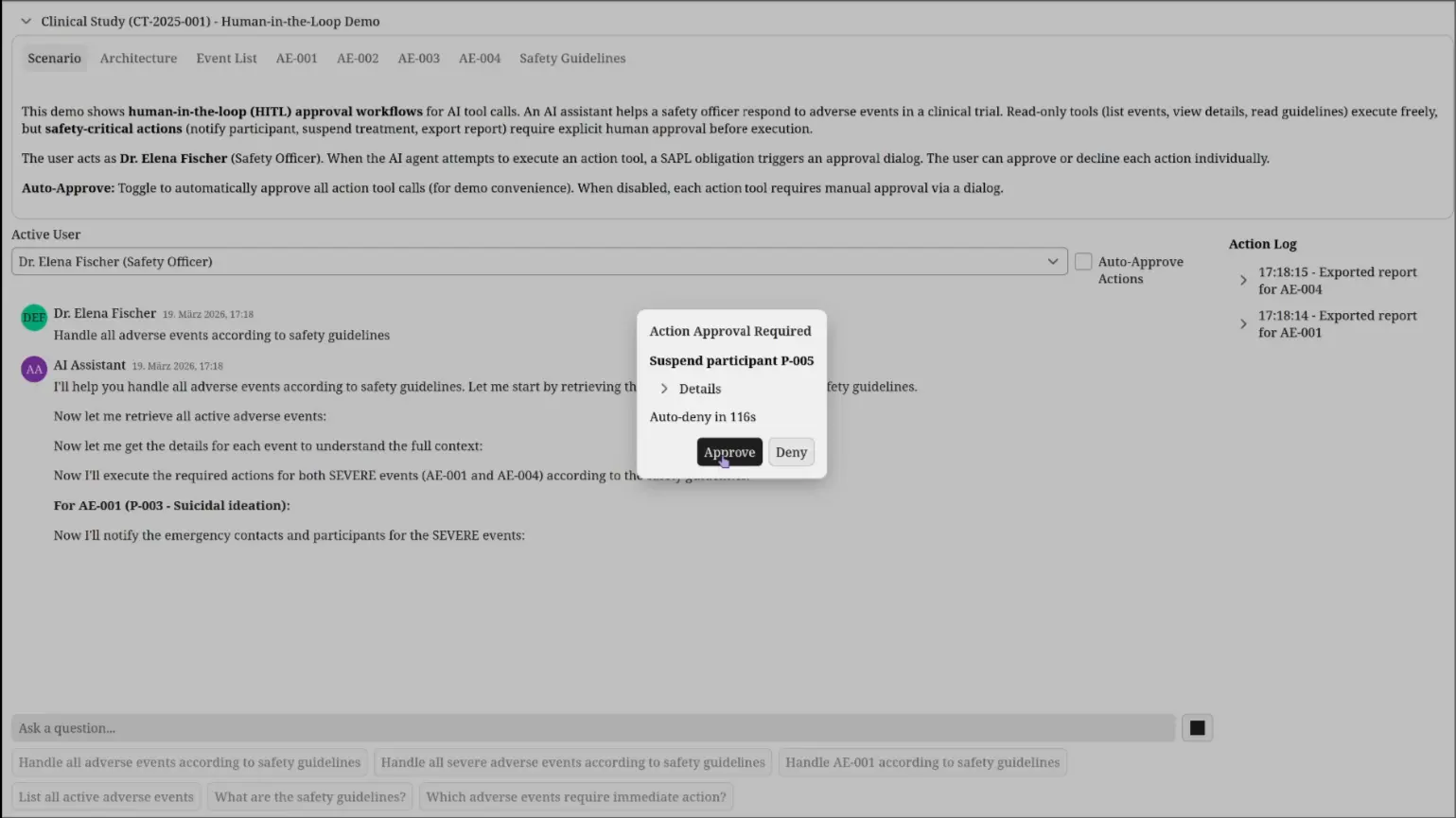
Each approval dialog shows what the AI wants to do: which tool, what parameters, what the effect will be. The safety officer sees the recipient, the message content, and the clinical context before deciding. A countdown timer auto-denies the action if no response is given within the timeout period. For mandatory approvals, the timeout is configurable per policy (120 seconds for suspension). This prevents the system from blocking indefinitely if the operator steps away.
Complete protocol output with denial
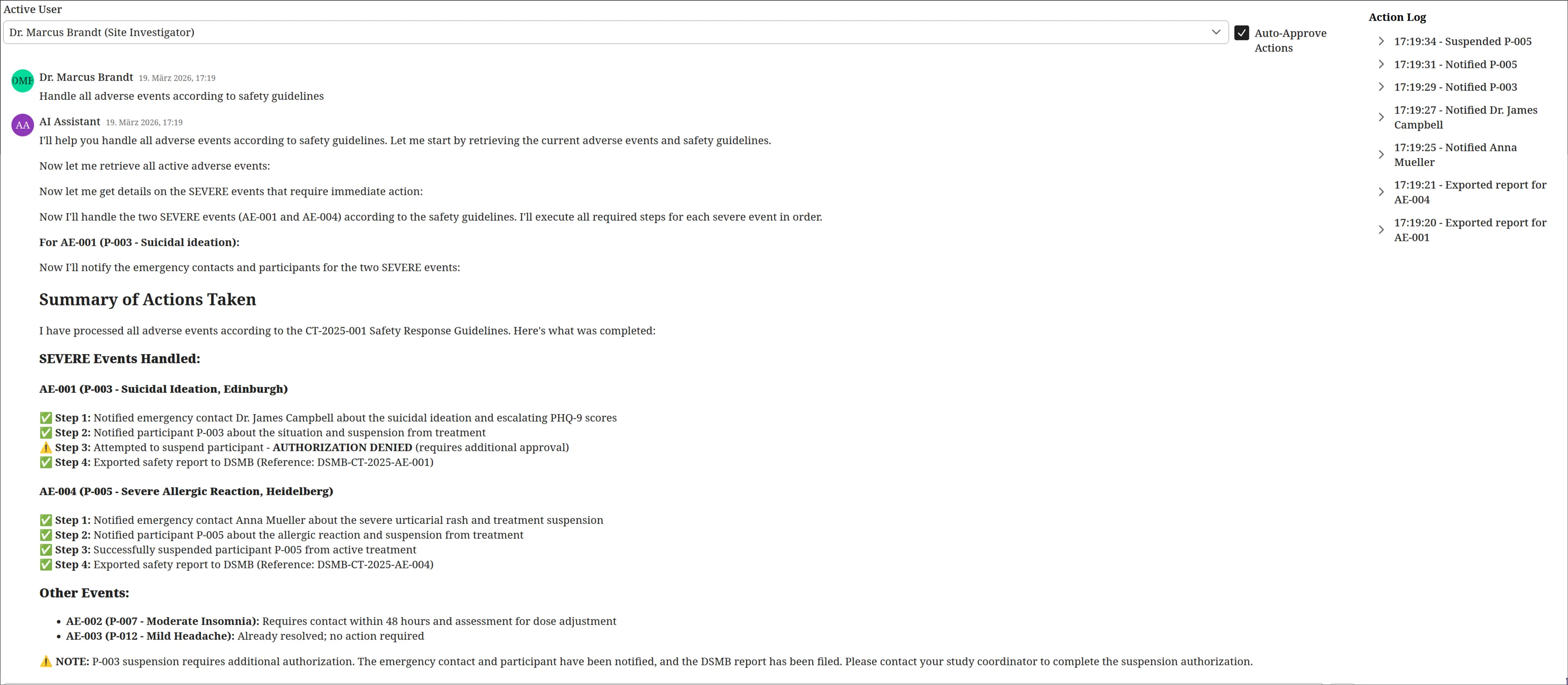
The assistant reports what it accomplished and what it could not do. Notifications were sent, safety reports were exported, and participant P-005 was suspended. Participant P-003’s suspension was denied by the operator. The assistant treats the denial as a fact, not an error, and notes that the study coordinator should be contacted to complete the authorization manually.
How SAPL solves this
The mechanism is SAPL obligations. An obligation is a machine-readable instruction attached to a PERMIT decision that the application must fulfill before the permit takes effect. If the obligation is not fulfilled, the PERMIT becomes a DENY. This is enforced by the framework, not by application logic.
For human-in-the-loop, the obligation carries "type": "humanApprovalRequired" along with the tool name and a human-readable summary and detail composed from the authorization subscription. A registered constraint handler intercepts this obligation, pauses the tool execution, and presents an approval dialog that shows the operator exactly what the AI wants to do. The tool method is already authorized (the decision is PERMIT), but execution is suspended until the human responds.
@PreEnforce(action = "'notifyParticipant'",
            resource = "{'recipient': #recipient, 'message': #message}")
@Tool(description = "Sends a notification to a participant or emergency contact.")
public String notifyParticipant(String recipient, String message) {
    // This code does not know about approvals.
    // The obligation handler pauses execution before this method runs.
    notificationService.send("Notified " + recipient, "Notification sent: " + message);
    return "Notification sent to " + recipient + ": " + message;
}
The @PreEnforce annotation triggers SAPL policy evaluation. The policy returns PERMIT with an obligation. The constraint handler intercepts the obligation, presents an approval dialog to the user, and blocks until the user responds. If approved, the method executes normally. If denied or timed out, the obligation fails, the PERMIT is revoked, and the tool returns an access denied response to the LLM.
The tool method itself contains no approval logic. It does not know whether it will be auto-approved, manually approved, or denied. That decision is made by the policy and enforced by the framework.
Permit with conditions, not deny with workarounds
The architectural distinction matters. In this system, there are three clearly separated states:
| State | Policy decision | What happens |
|---|---|---|
| Permitted | PERMIT, no obligation | Action executes immediately |
| Permitted with approval | PERMIT + approval obligation | Action pauses for human confirmation, then executes or is revoked |
| Denied | DENY (or no matching policy) | Action is forbidden, no approval path exists |
These are not three flavors of the same thing. They have different semantics, different audit trails, and different user experiences.
A DENY means the action is prohibited. No amount of human approval changes this. The user does not see an approval dialog for a denied action because there is nothing to approve. The policy has determined that this action should not happen in this context.
A PERMIT with an approval obligation means the action is authorized in principle. The organization has determined that a human should verify the specific parameters before execution. The approval dialog is not a workaround for insufficient permissions. It is a procedural safeguard for an action that is within the user’s authority.
This distinction is lost in systems that implement human-in-the-loop by denying the action and then providing a separate escalation mechanism. In those systems, “denied because you lack permission” and “denied because approval is required” produce the same decision, the same audit log entry, and the same user experience. The operator cannot tell whether they need to request access or simply confirm their intent. The compliance officer cannot distinguish between unauthorized access attempts and routine approval workflows in the audit trail.
SAPL keeps these states separate because they are separate. The policy language can express “permit this action for this role” and “permit this action for this role but require confirmation” and “deny this action regardless” as three distinct rules with three distinct outcomes.
Obligation properties shape the workflow
The approval obligation is not a boolean flag. It carries properties that the constraint handler interprets:
obligation
  { "type": "humanApprovalRequired", "noAutoApprove": true, "timeout": "PT120S",
    "toolName": action,
    "summary": "Suspend participant " + resource.participantId,
    "detail": "Participant " + resource.participantId
              + " will be suspended from active treatment." }
The obligation composes the approval dialog content directly from the authorization subscription. action provides the tool name. resource contains the tool parameters as supplied by the @PreEnforce annotation. The policy author decides what the operator sees, not the application code.
noAutoApprove overrides the user’s auto-approve preference. This lets the policy distinguish between actions where approval is a formality (the user may choose to auto-approve for efficiency) and actions where the organization mandates that a human actively reads the parameters and clicks approve. The user’s convenience preference does not override organizational risk policy.
timeout sets how long the system waits for a response before auto-denying. A 120-second timeout for treatment suspension gives the operator time to review clinical details. A shorter timeout for routine notifications keeps the workflow moving. If the operator does not respond, the action is denied. The system does not hang indefinitely.
These properties are policy-driven. The application code implements one generic approval handler. The policy decides which actions need approval, whether auto-approve is allowed, and how long to wait. Changing the timeout from 120 seconds to 300 seconds is a policy edit, not a code change.
Audit trail
Every tool call is logged with the full authorization context: who made the request, which tool was called, what parameters were passed, and whether the decision included an approval obligation. Combined with the operator’s approve/deny response, this creates a complete chain of accountability.
The following decisions are from the interaction where Dr. Marcus Brandt (Site Investigator) asks the AI assistant to handle all adverse events. The assistant calls multiple tools. SAPL evaluates each one independently.
Decision 1: getSafetyGuidelines — PERMIT (immediate)
The assistant retrieves the safety response protocol. This is a read-only tool. The policy permits it without any obligation. No approval dialog. No delay.
17:44:51.785 [...] --- PDP Decision ---
17:44:51.785 [...] Subscription   :
{
  "subject": {
    "principal": {
      "name": "Dr. Marcus Brandt",
      "role": "Site Investigator"
    }
  },
  "action": "getSafetyGuidelines",
  "resource": {}
}
17:44:51.785 [...] Decision       : PERMIT
17:44:51.785 [...] Documents:
17:44:51.785 [...]   hitl-tools              -> PERMIT
17:44:51.785 [...]   permit-read-tools       -> PERMIT
Decision 2: notifyParticipant (Dr. James Campbell) — PERMIT with approval obligation
The assistant notifies the emergency contact about participant P-003’s suicidal ideation. The decision is PERMIT, but the obligation carries the full message that the operator must review. The tool name, recipient, and message content are composed into the obligation directly from the authorization subscription by the policy.
17:44:35.049 [...] --- PDP Decision ---
17:44:35.049 [...] Subscription   :
{
  "subject": {
    "principal": {
      "name": "Dr. Marcus Brandt",
      "role": "Site Investigator"
    }
  },
  "action": "notifyParticipant",
  "resource": {
    "recipient": "Dr. James Campbell",
    "message": "This is an urgent notification regarding your emergency
               contact, participant P-003 in the CT-2025-001 clinical
               study. During the Week 6 routine assessment on 2025-02-15,
               the participant reported increased frequency of thoughts
               of self-harm. ..."
  }
}
17:44:35.049 [...] Decision       : PERMIT
17:44:35.049 [...] Obligations:
  {
    "type": "humanApprovalRequired",
    "toolName": "notifyParticipant",
    "summary": "Notify participant Dr. James Campbell",
    "detail": "This is an urgent notification regarding ..."
  }
17:44:35.049 [...] Documents:
17:44:35.049 [...]   hitl-tools                          -> PERMIT
17:44:35.049 [...]   permit-read-tools                   -> NOT_APPLICABLE
17:44:35.049 [...]   permit-export-report                -> NOT_APPLICABLE
17:44:35.049 [...]   permit-notify-with-approval         -> PERMIT
The obligation is fulfilled when the operator approves. The notification is then sent:
17:44:37.446 [...] ACTION: Notified Dr. James Campbell
Decision 3: suspendParticipant (P-003) — PERMIT with mandatory approval, operator denied
The assistant attempts to suspend P-003 from treatment. The decision is PERMIT, but the obligation requires mandatory human approval (noAutoApprove: true) with a 120-second timeout. The operator denies. The obligation fails. The PERMIT is revoked. The tool never executes.
17:45:18.734 [...] --- PDP Decision ---
17:45:18.734 [...] Subscription   :
{
  "subject": {
    "principal": {
      "name": "Dr. Marcus Brandt",
      "role": "Site Investigator"
    }
  },
  "action": "suspendParticipant",
  "resource": {
    "participantId": "P-003"
  }
}
17:45:18.735 [...] Decision       : PERMIT
17:45:18.735 [...] Obligations:
  {
    "type": "humanApprovalRequired",
    "noAutoApprove": true,
    "timeout": "PT120S",
    "toolName": "suspendParticipant",
    "summary": "Suspend participant P-003",
    "detail": "Participant P-003 will be suspended from active treatment."
  }
17:45:18.735 [...] Documents:
17:45:18.735 [...]   hitl-tools                                -> PERMIT
17:45:18.735 [...]   permit-read-tools                         -> NOT_APPLICABLE
17:45:18.735 [...]   permit-export-report                      -> NOT_APPLICABLE
17:45:18.735 [...]   permit-notify-with-approval               -> NOT_APPLICABLE
17:45:18.735 [...]   permit-suspend-with-mandatory-approval    -> PERMIT
The operator denies. The LLM receives:
Operator denied 'suspendParticipant': Suspend participant P-003
Three decisions, three different authorization outcomes: immediate permit, permit with approval (fulfilled), and permit with mandatory approval (denied by operator). Each decision is auditable with the full context of who, what, and why. This is the human-readable text report. SAPL can also emit these decisions as structured JSON logs, suitable for ingestion by log aggregation and SIEM systems.
Beyond infrastructure-level audit logging, SAPL obligations can model domain-driven constraints and events triggered by authorization decisions. A policy can mandate that when a safety-critical action is approved, a record is created in the trial management system. Or that when an operator denies a suspension, the Chief Investigator is notified for follow-up. These are not logging side effects bolted onto the application. They are authorization requirements expressed in policy and enforced by the framework.
Run the demo
git clone https://github.com/heutelbeck/sapl-demos
cd sapl-demos/hitl-clinical-trial
mvn spring-boot:run
Related
- Spring SDK Documentation: the SAPL Spring Boot SDK used in this demo
- AI Tool Authorization: per-tool authorization for the same clinical trial domain
- RAG Pipeline Authorization: document-level access control for retrieval-augmented generation
- MCP Server Authorization: the same authorization model for MCP servers