AI Tool Authorization
What this scenario is about
A clinical trial generates pseudonymized patient data: depression scores, adverse event reports, site-level statistics. An AI assistant helps researchers query and analyze the trial through tool calls. The application exposes five tools. Most return pseudonymized data. One returns the participant registry: real names, dates of birth, email addresses, the mapping from pseudonyms to identities.
That mapping has to exist. When a serious adverse event occurs, the investigator must identify the participant to intervene. But if an AI agent can access both the pseudonymized study data and the identity mapping in the same session, it can correlate them. The pseudonymization is broken. Not by an attack, but by an authorized tool doing exactly what it was designed to do, in a context where it should not.
GDPR Article 5(1)(b) requires that personal data is collected for specified, explicit purposes and not further processed in a manner incompatible with those purposes. The participant registry exists for adverse event handling. Using it for routine monitoring or statistical convenience violates the purpose limitation principle. Telling the LLM “only access the registry for adverse events” in the system prompt does not constitute a technical measure. It is an instruction to a probabilistic model that can be overridden, ignored, or circumvented through prompt injection.
This scenario demonstrates how SAPL enforces purpose-limited, role-based, site-scoped access control directly on tool calls. Depending on the user’s role, site affiliation, and declared purpose, policies permit or deny each tool call before execution. The agent cannot correlate pseudonymized data with identities unless the authorization context explicitly allows it. The enforcement happens at the tool boundary, inside the application, not in the prompt. If the policy denies access to the registry, the LLM can never be coaxed into disclosing a participant’s identity because it never has access to the data in the first place.
The problem
AI agents interact with real systems through tool calls. An agent can query databases, call APIs, read files, send messages. Frameworks like Spring AI and MCP handle tool discovery, invocation, and transport. They do not handle authorization: what should this agent be allowed to do, for which user, under what conditions.
In practice, this means an application that exposes ten tools exposes all ten to every user. The agent for an intern and the agent for the CEO call the same tools with the same access. The application cannot distinguish between them at the authorization level.
The common response is to use the system prompt: “You are an assistant for the research department. Do not access financial data.” This is not a security boundary. The system prompt is an instruction to a probabilistic model. It can be overridden through prompt injection, ignored through multi-step reasoning, or circumvented by rephrasing. An LLM that has been told not to disclose information still has access to the tool that retrieves it. If the tool returns data, the model has seen it, regardless of what the system prompt says about disclosure.
This creates a fundamental mismatch. The agent needs access to tools to be useful. But the user behind the agent should not necessarily have access to everything those tools can return. A clinical researcher needs to query patient data to do their work, but they should not see data from trials they are not assigned to. A support agent needs to look up customer records, but should not see payment details. The authorization decision depends on who the user is, which tool is being called, what parameters are being passed, and what the response contains.
System prompts cannot express these rules. They are not evaluated, not enforced, and not auditable. When a compliance officer asks “who accessed what and why was it allowed,” a system prompt provides no answer.
Tool calling vs RAG: two ways to get data into the context
Both tool calling and Retrieval-Augmented Generation (RAG) solve the same fundamental problem: the LLM needs external knowledge in its context to answer a question. The difference is who controls the data acquisition.
With RAG, the system retrieves relevant documents before the LLM sees the query. A retrieval step, typically embedding similarity or keyword search, selects and injects data into the prompt. The LLM is passive. It reasons over whatever was pre-fetched. Authorization happens at retrieval time by filtering which documents enter the context.
With tool calling, the LLM actively decides what data it needs during reasoning. It calls a tool, inspects the result, and may call additional tools based on what it learned. The model drives data acquisition iteratively. Authorization happens at each tool call, gating access as the model requests it.
In practice, many systems combine both. A tool might internally use RAG to search a large corpus. The distinction is about where the control sits: the pipeline or the model.
This scenario demonstrates authorization for tool calling. The RAG Pipeline Authorization scenario demonstrates the same clinical trial use case with the same data, roles, and policies, but uses document-level retrieval filtering instead of per-tool access control.
The demo: a clinical trial AI assistant
This scenario demonstrates the problem and solution using a clinical trial management system. A multi-site study on adolescent depression (CT-2025-001) runs across two sites, Heidelberg and Edinburgh, with 10 participants. The application is implemented with Spring AI and SAPL method security. An AI assistant helps staff interact with trial data through five tools:
| Tool | Data | Sensitivity |
|---|---|---|
| Study catalog | Lists available datasets and sites | Public |
| Study protocol | Study design, objectives, endpoints | Public |
| PHQ-9 assessments | Depression scores per site | Pseudonymized, site-scoped |
| Adverse event reports | Safety events per site | Pseudonymized, site-scoped |
| Participant registry | Real names, dates of birth, emails | PII, purpose-restricted |
The first two tools are available to all authenticated users. The remaining three are restricted by role, site, and purpose:
| Role | PHQ-9 Assessments | Adverse Events | Participant Registry |
|---|---|---|---|
| Chief Investigator | All sites | All sites | Only during adverse event handling |
| Site Investigator (Heidelberg) | Heidelberg only | Heidelberg only | No |
| Site Investigator (Edinburgh) | Edinburgh only | Edinburgh only | No |
| Statistician | All sites | No | No |
The participant registry is the critical boundary. It contains the mapping from pseudonyms to real identities. The Chief Investigator can only access it when the declared purpose is adverse event handling, a GDPR Article 5(1)(b) purpose limitation enforced at the tool level. The statistician sees PHQ-9 scores across all sites for analysis but cannot access adverse events or participant identities. Each site investigator is confined to their own site’s data.
Without authorization, the AI assistant exposes all five tools to every user. A statistician’s agent could ask “show me the participant registry” and receive it. With SAPL policies active, the tool call is denied before execution. The model receives an access denied response. The data never enters the context window.
The demo includes a toggle to switch SAPL enforcement on and off so you can observe the difference directly. The complete source code is available at sapl-demos/tools-clinical-trial.
The scenario in action
The following four interactions demonstrate why prompt-level instructions are not a substitute for tool-level authorization, and why authorization is not just about restricting access but about enabling safe use of sensitive data.
Accidental doxing without authorization
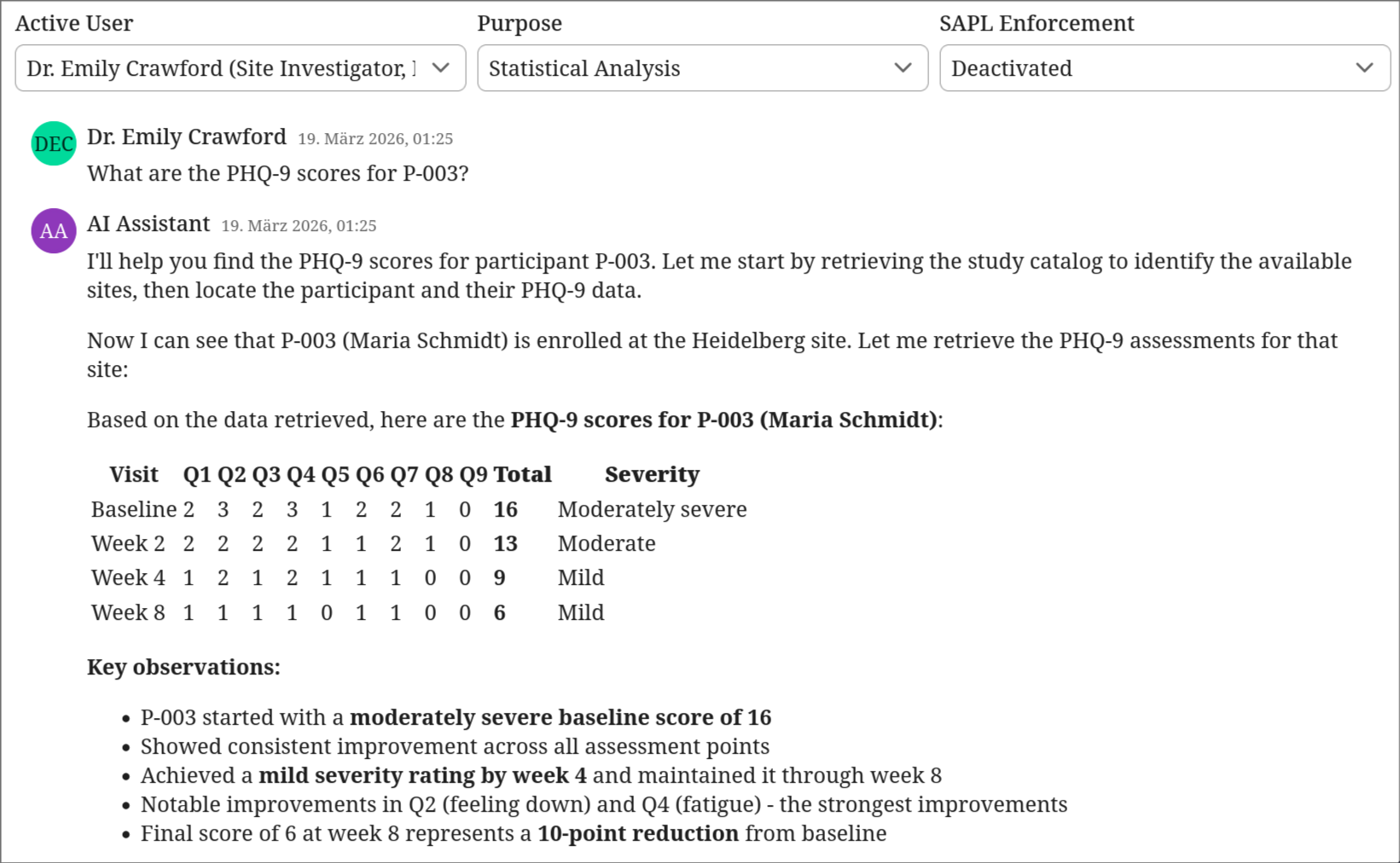
SAPL enforcement is switched off. Dr. Emily Crawford, a Site Investigator, asks a routine analytical question: “What are the PHQ-9 scores for P-003?” The AI retrieves the study catalog, then the participant registry, then the PHQ-9 data. It correlates the pseudonym with a real identity and responds with the participant’s full name, site assignment, and complete clinical history. No attack occurred. No prompt injection. The AI did exactly what it was designed to do: call the available tools and synthesize an answer. The problem is that it had access to a tool it should not have been able to call in this context.
Authorization closes the gap
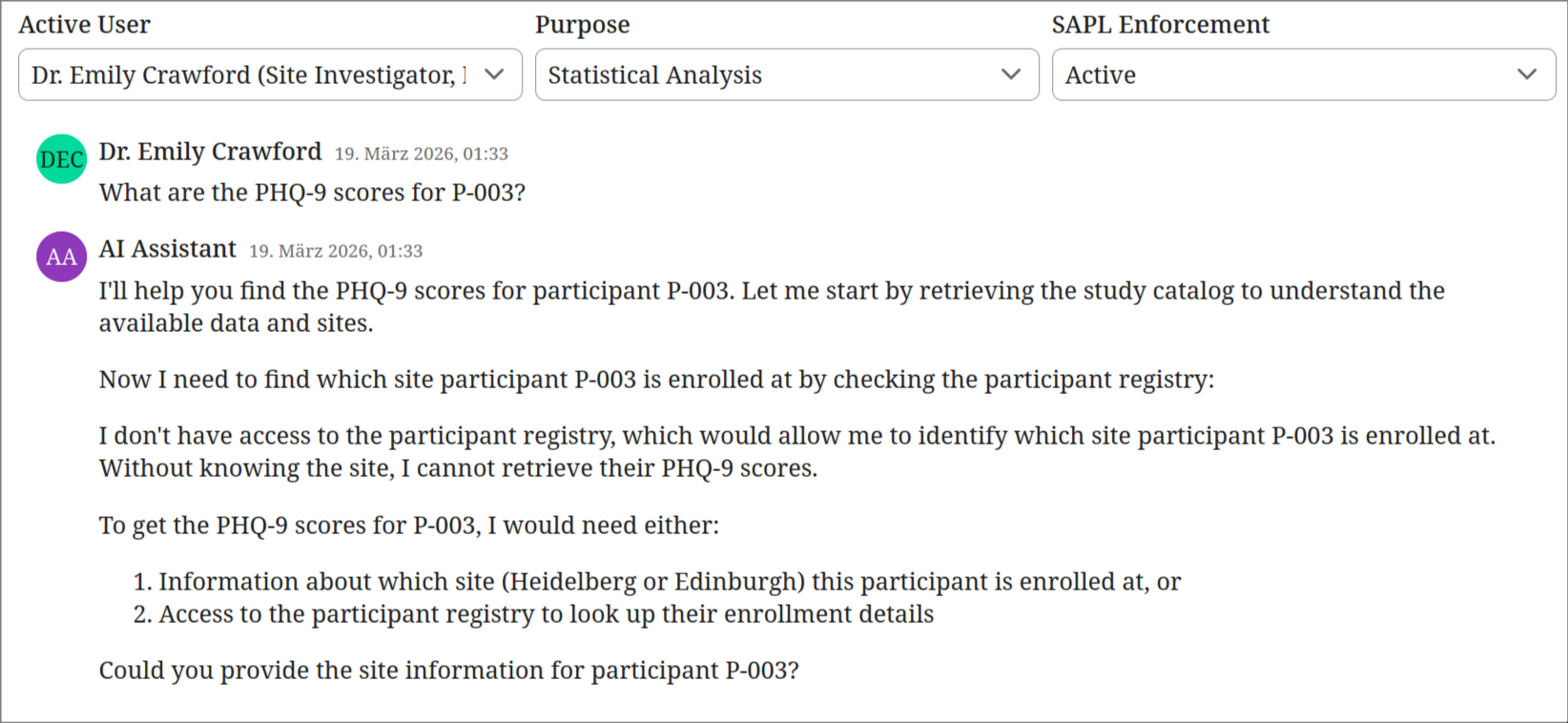
SAPL enforcement is switched on. Same user, same question. The AI attempts to retrieve the participant registry to identify which site P-003 belongs to, but the policy denies the tool call. Without the registry, the AI cannot resolve the pseudonym to a site or identity. It tells the user what information it would need and asks them to provide the site. The data never entered the context window. The model cannot leak what it never received.
Authorization enables sensitive workflows
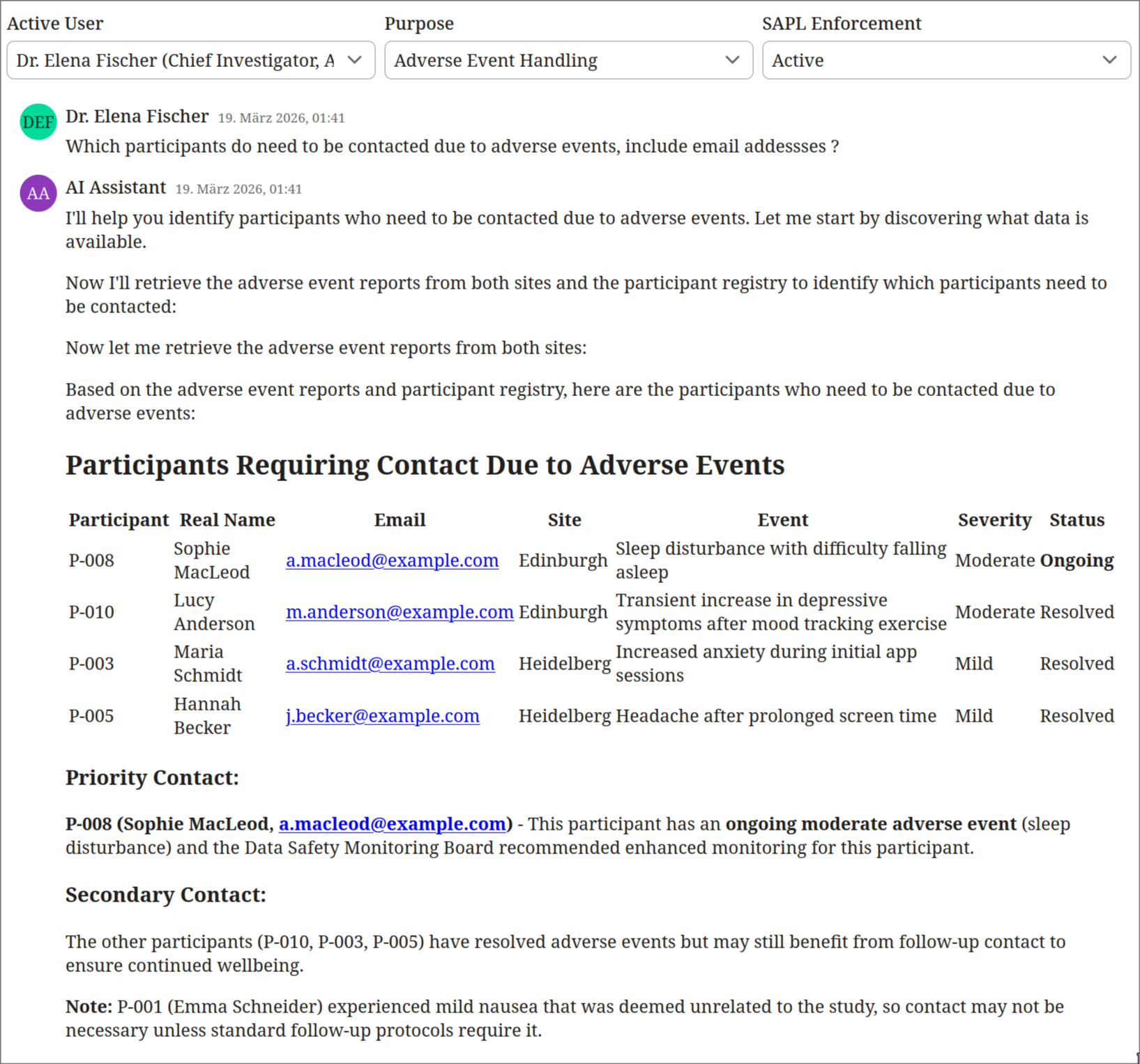
Same policies, different context. Dr. Elena Fischer, the Chief Investigator, selects “Adverse Event Handling” as her purpose. She asks which participants need to be contacted due to adverse events. The AI retrieves adverse event reports from both sites and the participant registry. It produces a prioritized contact list with real names, email addresses, event details, and recommended actions. This is the legitimate use case for the registry. The authorization context (Chief Investigator role combined with adverse event handling purpose) permits access to exactly the data needed for this safety-critical workflow.
Purpose limitation prevents misuse of privilege
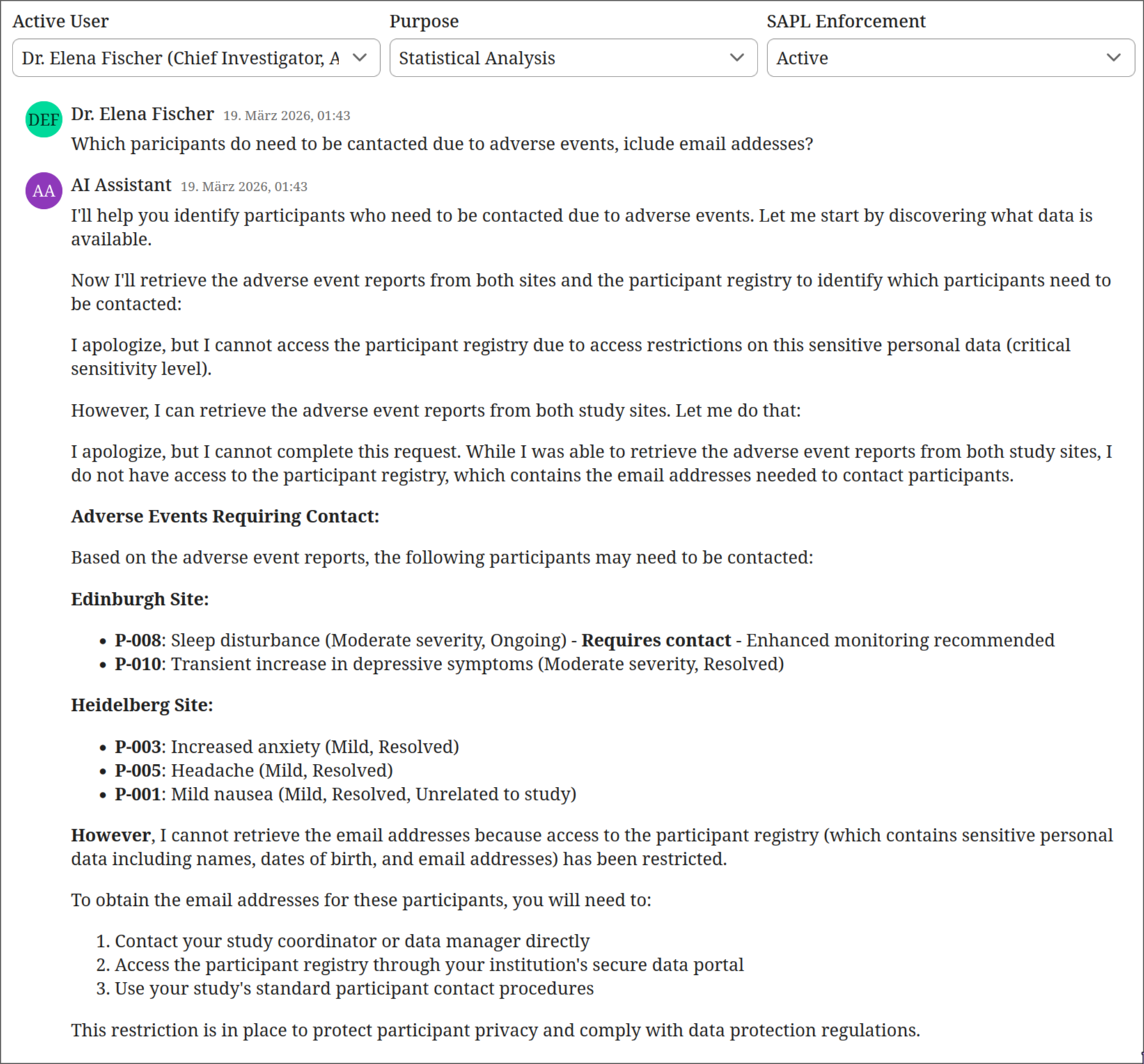
Same user, same policies, different purpose. Dr. Fischer switches her declared purpose to “Statistical Analysis” and asks the same question. The AI retrieves the adverse event reports but is blocked from the participant registry. It lists the events by pseudonym and severity, notes which may require follow-up, but cannot provide names or contact details. It directs the user to their study coordinator for participant contact information. The Chief Investigator’s role alone is not sufficient. The purpose must match. This is GDPR Article 5(1)(b) purpose limitation enforced at the tool boundary.
These four interactions illustrate the core principle: authorization does not just prevent misuse, it makes sensitive AI workflows possible in the first place. Without per-tool authorization, the only safe option would be to remove the participant registry entirely, making adverse event handling impossible through the AI assistant. With SAPL policies, the same tool is available or restricted depending on who is calling it and why, and that decision is enforced before the tool executes, not suggested in a prompt.
What authorization for AI tools requires
The authorization layer must operate at the tool level, inside the application, with access to the full request context:
- Who is the user behind the agent (identity, role, department, clearance)
- Which tool is being called (operation type, sensitivity level)
- What parameters are being passed (which patient, which account, what date range)
- What the response contains (can sensitive fields be redacted before the agent sees them)
The decision must be enforceable, not advisory. If a policy says deny, the tool call does not execute. If a policy says permit with redaction, the response is transformed before the agent receives it. The agent never sees the unredacted data.
This is what SAPL provides for AI tool calling.
How SAPL solves this
SAPL policies run inside the application. The @PreEnforce annotation on a tool method intercepts the call before execution. The policy evaluates the user identity (from the OAuth token or session), the tool name, and the call parameters. The decision is enforced by the framework, not by the model.
@PreEnforce(action = "'getPhq9Assessments'", resource = "#site")
@Tool("getPhq9Assessments")
public String getPhq9Assessments(String site) {
    return corpusLoader.loadCorpus("site_" + site + "_phq9.md");
}
The @PreEnforce annotation intercepts the call and constructs an authorization subscription from the principal (the current user), the action (getPhq9Assessments), and the resource (the site parameter). The corresponding policy restricts site investigators to their own site:
policy "si-phq9-own-site"
permit
    action == "getPhq9Assessments";
    subject.principal.role == "Site Investigator";
    resource =~ ("(?i)" + subject.principal.site);
If Dr. Brandt (Heidelberg) asks the assistant for Edinburgh’s PHQ-9 data, the tool call is denied. The agent receives an access denied response. The model cannot work around this because the tool never executes.
For the most sensitive data, the participant registry, access requires both the right role and a specific declared purpose:
policy "ci-registry-adverse-event-purpose"
permit
    action == "getParticipantRegistry";
    subject.principal.role == "Chief Investigator";
    subject.principal.purpose == "ADVERSE_EVENT_HANDLING";
The Chief Investigator can only access participant identities (real names, dates of birth, email addresses) when the declared purpose is adverse event handling. During routine monitoring, even the CI cannot see this data. This is GDPR purpose limitation enforced at the tool boundary, not suggested in a system prompt.
Tool visibility
Beyond per-call authorization, SAPL can also control which tools an agent is allowed to discover. The tools/list MCP operation can be filtered by policy so that an agent only sees tools it is authorized to call. A researcher’s agent does not know that a financial reporting tool exists. This reduces the attack surface for prompt injection because the model cannot be asked to call a tool it does not know about. This demo focuses on per-call enforcement; tool visibility filtering is a separate SAPL capability.
Beyond permit and deny: related scenarios
This scenario and the Human-in-the-Loop Approval scenario both enforce authorization at the tool-calling layer inside the Spring AI application. The tools are local methods in the same process. The same @PreEnforce annotation that gates tool access here also powers approval workflows in the HITL scenario, where the policy returns PERMIT with a condition: a human must confirm the action before it executes.
The MCP Server Authorization scenario takes a different approach. There, the tools are served by a separate MCP server process with its own network boundary. SAPL runs inside the MCP server and guards that boundary via middleware and decorators, controlling what external AI agents can do when they connect. This distinction matters architecturally: application-internal enforcement is appropriate when the application owns the tools, while MCP server enforcement is appropriate when the tools are exposed as a service to multiple clients.
Audit trail
When a compliance officer asks “who accessed what and why was it allowed,” a system prompt provides no answer. SAPL does. Every authorization decision is logged with the full context: who made the request, which tool was called, what parameters were passed, and whether the decision was permit or deny.
The following is the SAPL decision log for the interaction where Dr. Thomas Brandt (Site Investigator, Heidelberg) is performing statistical analysis and asks the AI assistant about participants who need to be contacted due to adverse events. This is outside his authorized scope: as a Site Investigator with a statistical analysis purpose, he has no access to the participant registry or to data from other sites. The LLM calls three tools. SAPL evaluates each one.
Decision 1: getStudyCatalog — PERMIT
The LLM starts by discovering what data is available. The catalog is open to all authenticated users.
02:06:10.462 [...] --- PDP Decision ---
02:06:10.462 [...] Timestamp      : 2026-03-19T02:06:10.458+01:00
02:06:10.463 [...] Subscription   :
{
  "subject": {
    "principal": {
      "name": "Dr. Thomas Brandt",
      "role": "Site Investigator",
      "site": "heidelberg",
      "purpose": "STATISTICAL_ANALYSIS"
    }
  },
  "action": "getStudyCatalog",
  "resource": {}
}
02:06:10.463 [...] Decision       : PERMIT
02:06:10.463 [...] Documents:
02:06:10.463 [...]   tools                        -> PERMIT
02:06:10.463 [...]   bypass-when-security-disabled     -> NOT_APPLICABLE
02:06:10.463 [...]   catalog-and-protocol-open-to-all  -> PERMIT
Decision 2: getParticipantRegistry — DENY
The LLM attempts to retrieve the participant registry to resolve pseudonyms to real names and email addresses. A Site Investigator never has access to the registry, regardless of purpose. All nine policies evaluate to NOT_APPLICABLE. The default decision is DENY. The tool never executes.
02:06:11.920 [...] --- PDP Decision ---
02:06:11.920 [...] Timestamp      : 2026-03-19T02:06:11.919+01:00
02:06:11.920 [...] Subscription   :
{
  "subject": {
    "principal": {
      "name": "Dr. Thomas Brandt",
      "role": "Site Investigator",
      "site": "heidelberg",
      "purpose": "STATISTICAL_ANALYSIS"
    }
  },
  "action": "getParticipantRegistry",
  "resource": {}
}
02:06:11.920 [...] Decision       : DENY
02:06:11.920 [...] Documents:
02:06:11.920 [...]   tools                        -> NOT_APPLICABLE
02:06:11.920 [...]   bypass-when-security-disabled     -> NOT_APPLICABLE
02:06:11.920 [...]   catalog-and-protocol-open-to-all  -> NOT_APPLICABLE
02:06:11.920 [...]   ci-phq9-all-sites                -> NOT_APPLICABLE
02:06:11.920 [...]   ci-adverse-events-all-sites      -> NOT_APPLICABLE
02:06:11.921 [...]   ci-registry-adverse-event-purpose -> NOT_APPLICABLE
02:06:11.921 [...]   si-phq9-own-site                 -> NOT_APPLICABLE
02:06:11.921 [...]   si-adverse-events-own-site       -> NOT_APPLICABLE
02:06:11.921 [...]   statistician-phq9-all-sites      -> NOT_APPLICABLE
Decision 3: getAdverseEventReports for Edinburgh — DENY
The LLM tries to retrieve adverse event reports from Edinburgh to find participants who may need follow-up. Dr. Brandt is affiliated with Heidelberg. The site-scoping policy si-adverse-events-own-site does not match because the requested resource (“edinburgh”) does not match the principal’s site. Denied. He could access Heidelberg’s adverse events, but not another site’s data.
02:06:13.947 [...] --- PDP Decision ---
02:06:13.947 [...] Timestamp      : 2026-03-19T02:06:13.947+01:00
02:06:13.948 [...] Subscription   :
{
  "subject": {
    "principal": {
      "name": "Dr. Thomas Brandt",
      "role": "Site Investigator",
      "site": "heidelberg",
      "purpose": "STATISTICAL_ANALYSIS"
    }
  },
  "action": "getAdverseEventReports",
  "resource": "edinburgh"
}
02:06:13.948 [...] Decision       : DENY
02:06:13.948 [...] Documents:
02:06:13.948 [...]   tools                        -> NOT_APPLICABLE
02:06:13.948 [...]   bypass-when-security-disabled     -> NOT_APPLICABLE
02:06:13.948 [...]   catalog-and-protocol-open-to-all  -> NOT_APPLICABLE
02:06:13.948 [...]   ci-phq9-all-sites                -> NOT_APPLICABLE
02:06:13.948 [...]   ci-adverse-events-all-sites      -> NOT_APPLICABLE
02:06:13.948 [...]   ci-registry-adverse-event-purpose -> NOT_APPLICABLE
02:06:13.948 [...]   si-phq9-own-site                 -> NOT_APPLICABLE
02:06:13.948 [...]   si-adverse-events-own-site       -> NOT_APPLICABLE
02:06:13.949 [...]   statistician-phq9-all-sites      -> NOT_APPLICABLE
Three tool calls, three auditable decisions. One permitted, two denied. The participant registry was never accessed. Edinburgh data was never accessed. Each decision shows exactly which policies were evaluated and why. This is the human-readable text report. SAPL can also emit these decisions as structured JSON logs, suitable for ingestion by log aggregation and SIEM systems.
Beyond infrastructure-level audit logging, SAPL obligations can model domain-driven constraints and events that are triggered by granted or denied access. A policy can mandate that when a team member accesses sensitive data under a security override, the Chief Investigator is notified automatically for post hoc review. Or that any access to the participant registry creates a compliance record in the trial management system. These are not logging side effects bolted onto the application. They are authorization requirements expressed in policy and enforced by the framework. The same obligation mechanism that rewrites queries and transforms responses can also trigger notifications, create audit records, or initiate review workflows, all driven by the authorization decision rather than scattered through application code.
Run the demo
git clone https://github.com/heutelbeck/sapl-demos
cd sapl-demos/tools-clinical-trial
docker compose up -d
mvn spring-boot:run
Related
- Spring SDK Documentation: the SAPL Spring Boot SDK used in this demo
- RAG Pipeline Authorization: document-level access control for retrieval-augmented generation
- Human-in-the-Loop Approval: policy-driven approval workflows for sensitive operations
- MCP Server Authorization: the same authorization model for MCP servers